
Custom Construction Management Software & Operations Portal
Replaced a residential construction company's patchwork of disconnected spreadsheets and email threads with a single, secure, role-based web portal — unifying sub-contractor onboarding, project tracking, client reporting, recruitment, and punch-list management into one application that grew organically alongside the business.
12+
Operational Modules
More than a dozen back-office tools unified into a single portal
Role-Based
Access Control
A permission matrix gates the navigation menu and every page request
1-Click
Client Reporting
Weekly reports auto-generated as PDFs and emailed to homeowners
Zero
Data Migration
Existing Google Sheets were kept in place as the live database
The Challenge
Shoreline Construction ran its operations across dozens of disconnected spreadsheets, Google Docs, and manual email threads. Superintendents, project managers, recruiters, and administrators each needed different slices of the same data, but there was no single place to access it, no access control, and no consistent way to capture or report on it. Onboarding a new employee meant sharing a dozen URLs; producing a weekly client report meant manually assembling a document from scattered notes and photos. The company needed one secure front door to everything — without ripping out the spreadsheets the team already trusted as their source of truth.
Our Solution
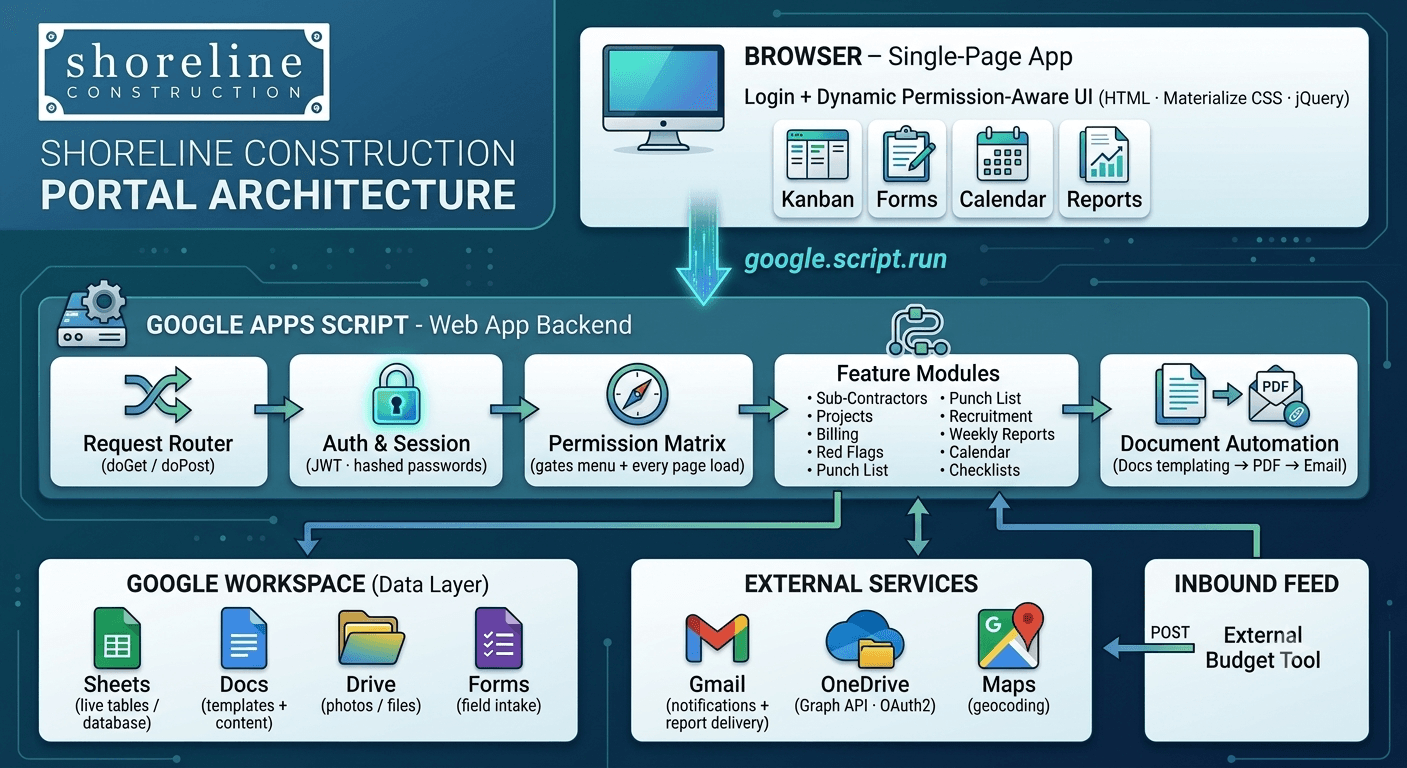
We built a single-page web portal on Google Apps Script, deployed as a web app that sits directly on top of the company's existing Google Workspace data. Users log in once and see a personalized, collapsible navigation menu showing only the sections they're authorized to use, backed by a permission matrix and signed JWT sessions. A core design principle kept the spreadsheets as the live database — the portal reads, filters, joins, and writes to Google Sheets in real time rather than forcing a risky migration. New modules were added as configuration and self-contained views, so the platform grew from a handful of tools to well over a dozen without ever requiring a rebuild.
How We Built It
A detailed look at each layer of the automated pipeline architecture.
Authentication & Role-Based Access Control
Users sign in with hashed credentials and receive a signed, expiring JWT session token. A central permissions matrix maps each user to the exact sections they can access — gating both the navigation menu and every page request, so a user can neither see nor reach a section they aren't authorized for. Admin tooling supports adding and editing users, toggling access per section, resetting passwords (with an automatic security-alert email), and deactivating accounts, while new users set their password automatically on first sign-in.
Dynamic, Permission-Aware Navigation
The multi-level collapsing sidebar is generated at runtime from configuration data rather than hard-coded. Menu structure, icons, ordering, and access rules are all data-driven, so adding a new section to the portal is a configuration change, not a code change. The same mechanism surfaces curated Google Docs inline through a built-in document viewer.
Sub-Contractor Lifecycle Management
New vendors move through a three-stage approval pipeline. An Add step captures sub-contractor details and a photo, with duplicate detection (by name, phone, or email) and image upload to Drive; a Verify step lets a reviewer accept or reject the submission with remarks; and an Authorize step gives final sign-off, automatically promoting approved vendors into the company's master vendor list. Each stage records who acted, when, and any remarks — creating a fully auditable approval trail.
Project & Build-Stage Tracking
Schema-driven forms create and update projects with budgets, addresses, assigned manager/designer/superintendent, and custom build stages with completion percentages. A Project Stage Checker shows where each job stands in its pipeline, while Project Billing configures billing periods and per-service breakdowns against each budget. Project changes automatically sync the company's intake Google Form so field-submission dropdowns always stay current.
Client Experience Timelines
With a single click, the portal spins up a per-project 'client experience' worksheet from a template. Milestone dates are viewed and edited on an interactive timeline, and every change is annotated with the user and timestamp for accountability — giving the team a clear, shared view of where each homeowner's journey stands.
Red Flag Management
A dedicated module raises, tracks, and resolves 'red flags' against at-risk jobs, capturing issue details, due dates, status colors (schedule and client-temperature indicators), and free-form notes per job. Moving an item to complete automatically transfers it from the active queue into a completed-tasks archive, preserving a full change-log history such as automatically recorded date revisions.
Master Punch-List Tracker
A full CRUD interface manages punch-list items across every job — add, edit, delete, and toggle completion status. Each item carries a unique ID, the responsible vendor or sub-contractor, its job association, and notes, giving the team a single authoritative list of outstanding work.
Recruitment Tracker (Kanban)
A drag-and-drop Kanban board runs the hiring funnel, organizing applicants by stage (phone interview, in-person interview, offer, and beyond). Moving a candidate card between columns appends a tracked change record, and recruiters can attach notes that persist as a running history. A parallel Employee Temperature Tracker reuses the same board pattern to monitor current-employee status.
Automated Weekly Client Reporting
The portal's most involved workflow turns a guided weekly-update form — capturing design approvals, per-phase field progress, close-out items, target dates, and on-site photos — into a finished client report. On generation it merges the data into a Google Docs template (checking boxes, filling fields, and embedding resized photos), converts the result to PDF, and emails it directly to the homeowner with the PM/PD team CC'd. Photo storage is pluggable between Google Drive and Microsoft OneDrive (via the Microsoft Graph API and OAuth2), switchable with a single configuration flag.
Shared Company Calendar
A visual company calendar lets users create events, share them with specific people or everyone, and optionally trigger email notifications to selected recipients. Events are permission-scoped, so each user sees only the events shared with them or marked public.
Recognition & Culture Tools
A 'Thank You Card' feature on the dashboard lets the team capture and display peer recognition — including video shout-outs — reinforcing company culture inside the same tool people already use for their daily work.
Superintendent Checklists
Starts and Daily field checklists give superintendents structured job-site workflows, with their questions sourced live from a Google Doc so non-technical staff can edit checklist content without touching the app. Every response is timestamped and logged per job.
External Data Ingestion
A public endpoint receives exported budget and cost data from an external system, parses and logs it, and appends it to the budgeting database — bridging a third-party tool directly into the company's data ecosystem.
Technology Stack
The tools and technologies powering this solution