
Automated Weather & River Data Pipeline
Built a fully automated, zero-intervention weather and river intelligence pipeline for Rivers Bend Camping in New Haven, Vermont — turning 5 external data sources into always-current website visuals and dashboards.
5
Data Sources Integrated
WeatherLink, Weather Underground (2), USGS Water Services, National Weather Service
Zero
Manual Intervention
Fully automated pipeline with no human involvement needed
6
Pipeline Layers
Local Automation → Cloud Automation → Data Ingestion → Storage → Visualization → Website
Daily
Update Frequency
All data sources are automatically refreshed on a daily schedule
The Challenge
Rivers Bend Camping (New Haven, VT) markets a family-oriented, riverfront outdoor experience where conditions directly impact guest planning and daily operations. Their website needed dependable, up-to-date weather and river insights for campers before and during stays. The required data came from 5 distinct sources — including authenticated weather portals, scraped weather pages, and public river/weather APIs. Manual updates were too slow and inconsistent for peak-season needs, so the team needed a reliable, fully automated system with zero daily handwork.
Our Solution
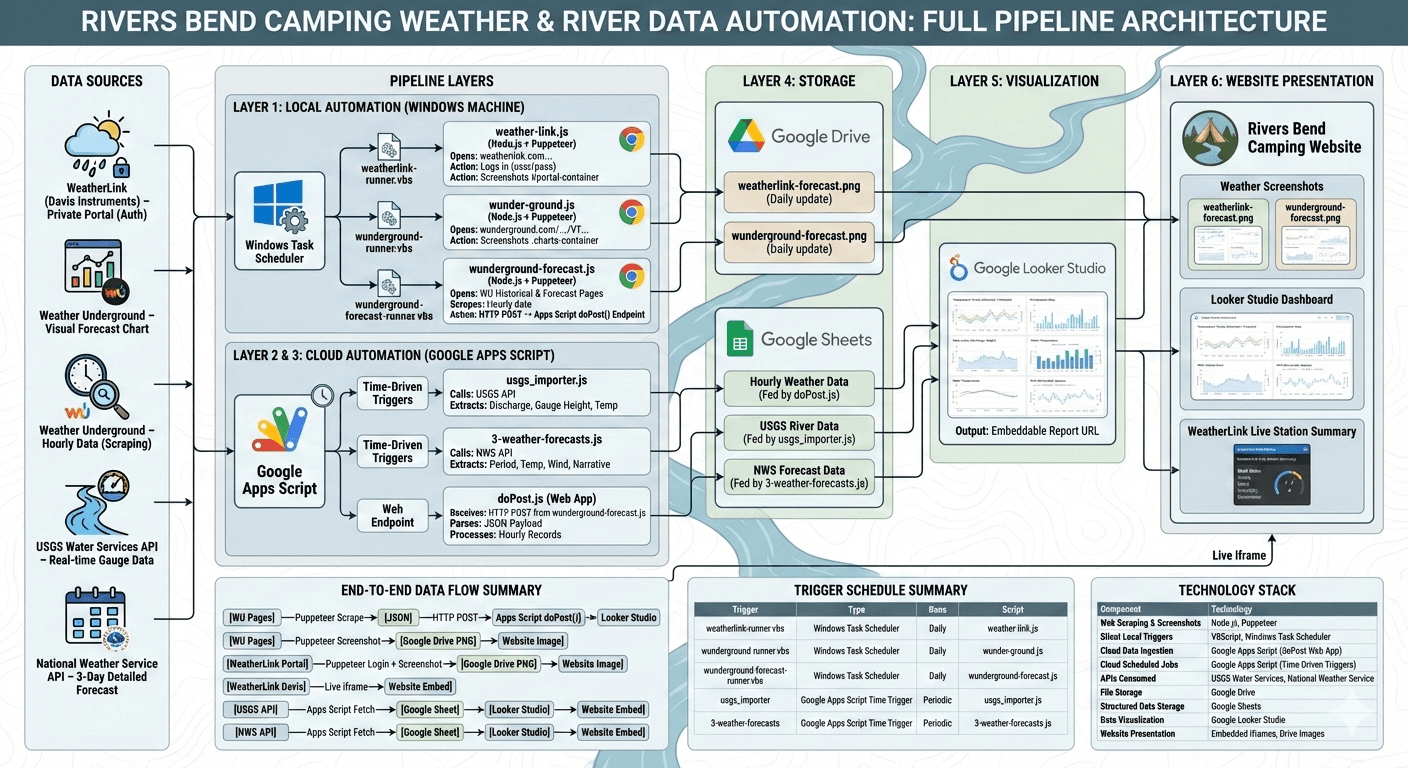
We implemented a 6-layer automation architecture that runs end-to-end without manual intervention. Local Puppeteer jobs (scheduled through Windows Task Scheduler) handle browser-authenticated capture and Weather Underground scraping. Google Apps Script then orchestrates scheduled USGS and National Weather Service API imports plus webhook-based ingestion from local scrapers. The system consolidates everything into Google Sheets, powers Looker Studio visual dashboards, and publishes live outputs to the Rivers Bend website via embedded iframes and auto-refreshed Google Drive images.
How We Built It
A detailed look at each layer of the automated pipeline architecture.
Layer 1 — Local Automation
Three Node.js + Puppeteer scripts run silently on a Windows machine via VBScript triggers scheduled in Windows Task Scheduler. The weather-link.js script authenticates into the private WeatherLink portal and captures a screenshot of the weather station dashboard. The wunder-ground.js script navigates to Weather Underground and screenshots the visual forecast chart. The wunderground-forecast.js script performs deep web scraping — crawling 4 days of historical data and 4 days of forecast data from Weather Underground, extracting hourly readings for temperature, humidity, wind, pressure, precipitation, and conditions. The scraped data is then sent via HTTP POST to a Google Apps Script web endpoint.
Layer 2 & 3 — Cloud Automation & Data Ingestion
Google Apps Script handles the cloud side with time-driven triggers. The usgs_importer.js script calls the USGS Water Services API to extract real-time river data including water discharge (cubic ft/s), gauge height (ft), and water temperature (°C). The 3-weather-forecasts.js script calls the National Weather Service API for detailed 3-day forecasts including period names, temperatures, wind conditions, and narrative descriptions. A separate doPost.js web app endpoint receives the POST request from the local Puppeteer scraper and writes the hourly weather data into Google Sheets.
Layer 4 & 5 — Storage & Visualization
All data converges in Google Sheets across three organized tabs: Hourly Weather Data (fed by the web scraper via Apps Script), USGS River Data (fed by the API importer), and NWS Forecast Data (fed by the forecast script). Screenshot images are stored in Google Drive and auto-updated daily. Google Looker Studio connects to the Sheets data to generate interactive charts and visualizations — temperature trends, precipitation data, river levels, water temperature, wind patterns, and humidity.
Layer 6 — Website Presentation
The Rivers Bend Camping website presents all collected data through three channels: auto-updated weather screenshot images pulled from Google Drive, an embedded Looker Studio dashboard providing interactive charts and visualizations, and a live WeatherLink station summary widget showing real-time temperature, wind, humidity, and barometer readings. Campers visiting the website get a comprehensive, always-current view of weather and river conditions — all powered by the fully automated pipeline running behind the scenes.
Technology Stack
The tools and technologies powering this solution