
Node.js Shopify Data Integration Engine
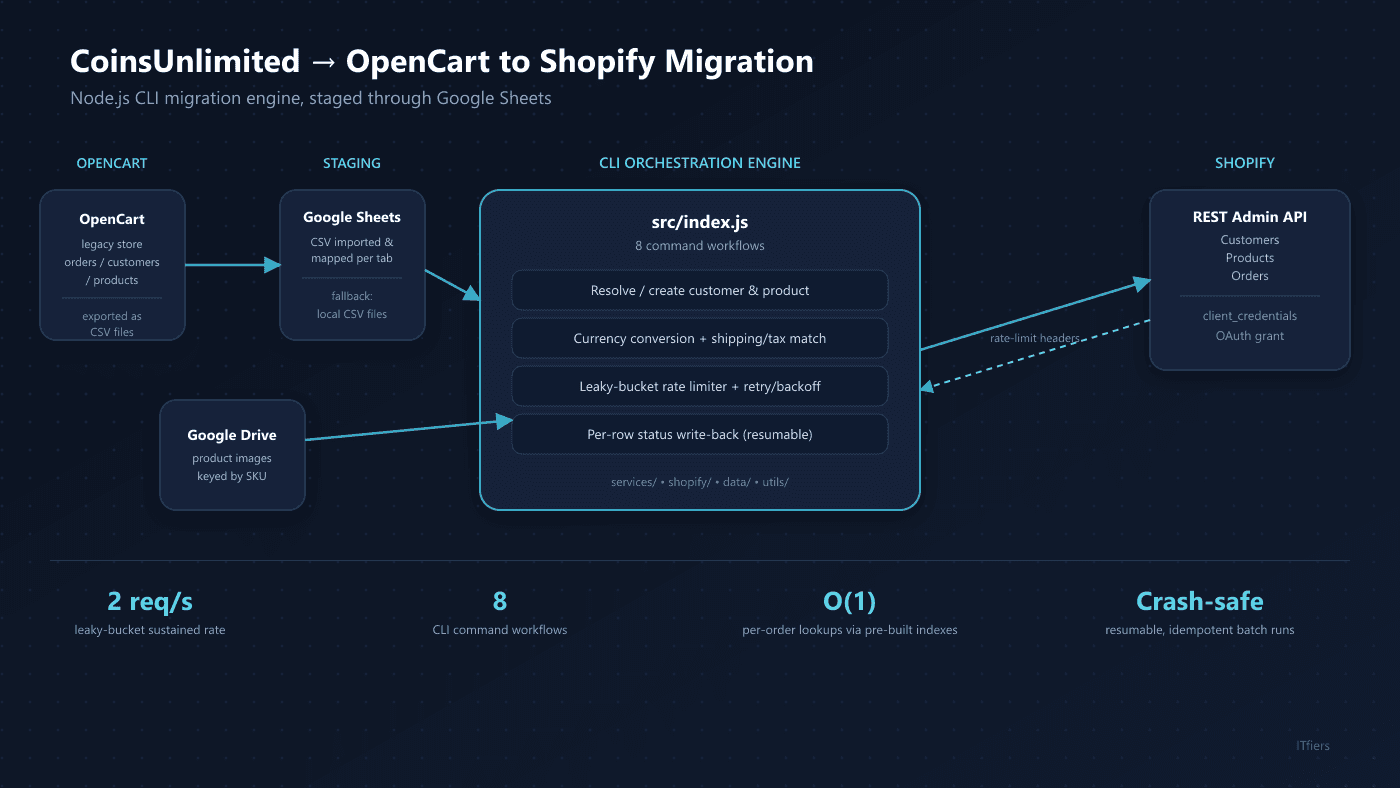
Built a Node.js CLI tool to migrate CoinsUnlimited's order, customer, and product data from OpenCart into Shopify — using Google Sheets as the staging layer for exported CSVs, and implementing Shopify's exact leaky-bucket rate limiter and resumable per-order batch processing to move everything across reliably at scale.
8
CLI Commands
From core order processing to Shopify sync-back, cleanup, and date-correction tooling
Leaky Bucket
Rate Limiting
Faithful reimplementation of Shopify's documented algorithm, resynced from response headers on every call
Resumable
Batch Processing
Per-row status persistence means a crash mid-run never forces reprocessing completed orders
2, Swappable
Data Sources
Google Sheets or local CSV, selected purely by environment configuration
The Challenge
CoinsUnlimited was migrating its store from OpenCart to Shopify. OpenCart's order, customer, and product data was exported as CSV files, which ITfiers loaded into Google Sheets to serve as a staging and mapping layer between the two platforms. From there, every order's customer and products needed to be resolved or created in Shopify, priced and taxed correctly, and tracked back into the spreadsheet — reliably, under Shopify's strict API rate limits, without one bad order halting an entire batch, and without reprocessing already-completed orders if a run crashed partway through a large migration batch.
Our Solution
We built a standalone Node.js CLI tool with a layered architecture to drive the migration: an orchestration layer for each business workflow, a service layer per external concern (Shopify customers/products/orders, Google Sheets, Google Drive), a transport layer that implements Shopify's own documented leaky-bucket rate-limiting algorithm with header-based resynchronization and retry/backoff, and a data layer that abstracts Google Sheets and local CSV behind one interface so the tool can run against either without any code changes. Every exported order is processed with per-row status write-back, making the migration batches resumable and crash-safe, while 422 validation errors on customer creation are self-healed by clearing just the offending field and retrying — keeping throughput high without silently failing on messy OpenCart export data.
How We Built It
A detailed look at each layer of the automated pipeline architecture.
Google Sheets as the OpenCart-to-Shopify Staging Layer
OpenCart's orders, customers, and products were exported as CSV and loaded into Google Sheets, which became the working staging area for the migration — every row tracked against its eventual Shopify counterpart. The CLI entry point (src/index.js) holds only orchestration logic — what order to do things in, what to do on success or failure — while dedicated services encapsulate each external concern: Shopify customers, products, and orders; Google Sheets; and Google Drive. A transport layer (ShopifyClient) handles authentication, rate limiting, retries, and pagination completely decoupled from what's being sent. This separation meant the rate limiter, retry logic, and indexing strategy could all be hardened independently without touching the migration's business rules.
A Faithful Leaky-Bucket Rate Limiter
Rather than relying on fixed sleep delays, we implemented Shopify's exact documented leaky-bucket algorithm from scratch — a 40-token bucket that leaks at 2 tokens per second, with an acquire() call that computes an exact wait time from the current deficit instead of polling. Every response's X-Shopify-Shop-Api-Call-Limit header re-syncs the limiter's internal token count against Shopify's own authoritative state, correcting for drift if other processes are hitting the same store. This lets the system run at close to Shopify's real maximum sustained throughput while avoiding 429s under normal conditions.
Resumable, Crash-Safe Batch Processing
Every order row carries a status column that acts as the idempotency marker: orders already marked processed are skipped on the next run, and each row's status is written back immediately after that order finishes — not batched at the end — so a killed or crashed process leaves already-completed orders correctly marked and only genuinely unprocessed orders get retried. Customer and product mappings are appended to their tracking sheets the moment they're created, so a second order referencing the same customer later in the same run doesn't trigger a duplicate creation.
Self-Healing Customer Validation
Source data isn't always clean — a malformed phone number or an invalid address field will make Shopify reject a customer with a 422 and a field-level error map. Instead of failing the whole order, the system parses that error map, clears exactly the offending field (supporting nested paths like addresses[0].city), retries once with the sanitized payload, and records what was cleared as a non-fatal warning. This prioritizes order throughput — one bad phone number shouldn't block a customer from ever syncing — while still surfacing the data-quality issue for human review.
Currency, Shipping, and Tax Handling
Each order's line items are priced against an optional per-order exchange rate, applying precise fixed-point conversion only when a conversion actually happens to avoid introducing floating-point artifacts into orders that don't need it. Shipping and tax totals are matched against the source data's free-form charge titles using case-insensitive substring keywords (covering values like "Shipping," "Xpresspost," "GST," and "HST") rather than a fixed enum, since the upstream system was never normalized to one — the keyword list was expanded over time as new title variants surfaced in production data.
Correcting Shopify's Default-Address Side Effect
Creating an order in Shopify silently overwrites the customer's default shipping address — an undocumented-feeling behavior that would otherwise corrupt customer records over many orders. Because the sync-back step already captures each customer's original default_address_id, the system restores it with an explicit follow-up call after every order, treating a failure here as a non-fatal warning since the order itself already succeeded.
Dual Data-Source and Image-Source Support
The entire system supports Google Sheets or local CSV, and Google Drive or a local image folder, as fully interchangeable backends selected purely by which environment variables are set — no business-logic branching anywhere in the orchestration layer. This let the business run the tool offline or in testing against CSV fixtures using the exact same code path that runs against live Sheets and Drive data in production.
Operational and Maintenance Tooling
Beyond the core process-orders command, the tool ships sync-customers and sync-products to pull Shopify's own records back into the tracking sheets, assign-emails to backfill customer emails via internal-ID matching, reset-orders to force reprocessing, and both bulk (delete-orders) and targeted (delete-sheet-orders) order-deletion commands for cleanup. An update-order-dates command corrects a systematic timezone discrepancy discovered after initial deployment, parsing day-first source dates and applying a configurable hour offset to Shopify's processed_at field — evidence of a tool that has kept being actively used and extended for real operational needs, not just first-run data seeding.
Technology Stack
The tools and technologies powering this solution