
n8n Workflow Automation for Shopify Order Processing
Rebuilt a working Node.js order-sync tool as four self-service n8n workflows on a self-hosted instance — giving CoinsUnlimited native scheduling, execution history, and a visual automation the team can trigger and monitor without developer or command-line access.
4
Workflows Built
Process Orders, Sync Customers, Sync Products, and Assign Emails, each independently schedulable
0
Destructive Commands Automated
Bulk delete/reset commands were deliberately kept manual, not scheduled
Built-In
Execution Visibility
Native n8n run history replaces reading console output or spreadsheet status columns
4
Documented Simplifications
Every intentional behavioral difference from the Node.js tool is explicitly tracked, not silent
The Challenge
CoinsUnlimited already had a working Node.js CLI tool that synchronized orders, customers, and products between a Google Sheets-based data source and their Shopify store. It worked, but it depended on someone running commands from a terminal or an external OS-level scheduler, and there was no dashboard or run history — checking whether a sync succeeded meant reading console output or the spreadsheet's status column by hand. The business needed the same reliable automation, but visible and operable without developer access: a schedule that could be seen and adjusted, and a record of what ran and when.
Our Solution
We rebuilt the four non-destructive commands of the Node.js tool — process orders, sync customers, sync products, and assign emails — as four independent n8n workflows on a self-hosted instance, authored through the n8n MCP server's Workflow SDK rather than by hand-clicking every node. Each workflow ships with both a manual trigger for on-demand runs and a schedule trigger (hourly for order processing, daily for the sync and email-assignment jobs), so the automation now has native execution history and a visual run status in the n8n UI. The most complex piece — full order processing, including customer/product resolution, currency conversion, and shipping/tax matching — was ported as a single Code node that mirrors the proven Node.js logic verbatim, prioritizing behavioral fidelity over decomposing it into many generic nodes. Two destructive, maintenance-only commands were deliberately left out of the automation, and every intentional behavioral difference from the original tool — rate-limit handling, image uploads, error retries, and sync semantics — was documented rather than left to be discovered later.
How We Built It
A detailed look at each layer of the automated pipeline architecture.
One Workflow per Business Command
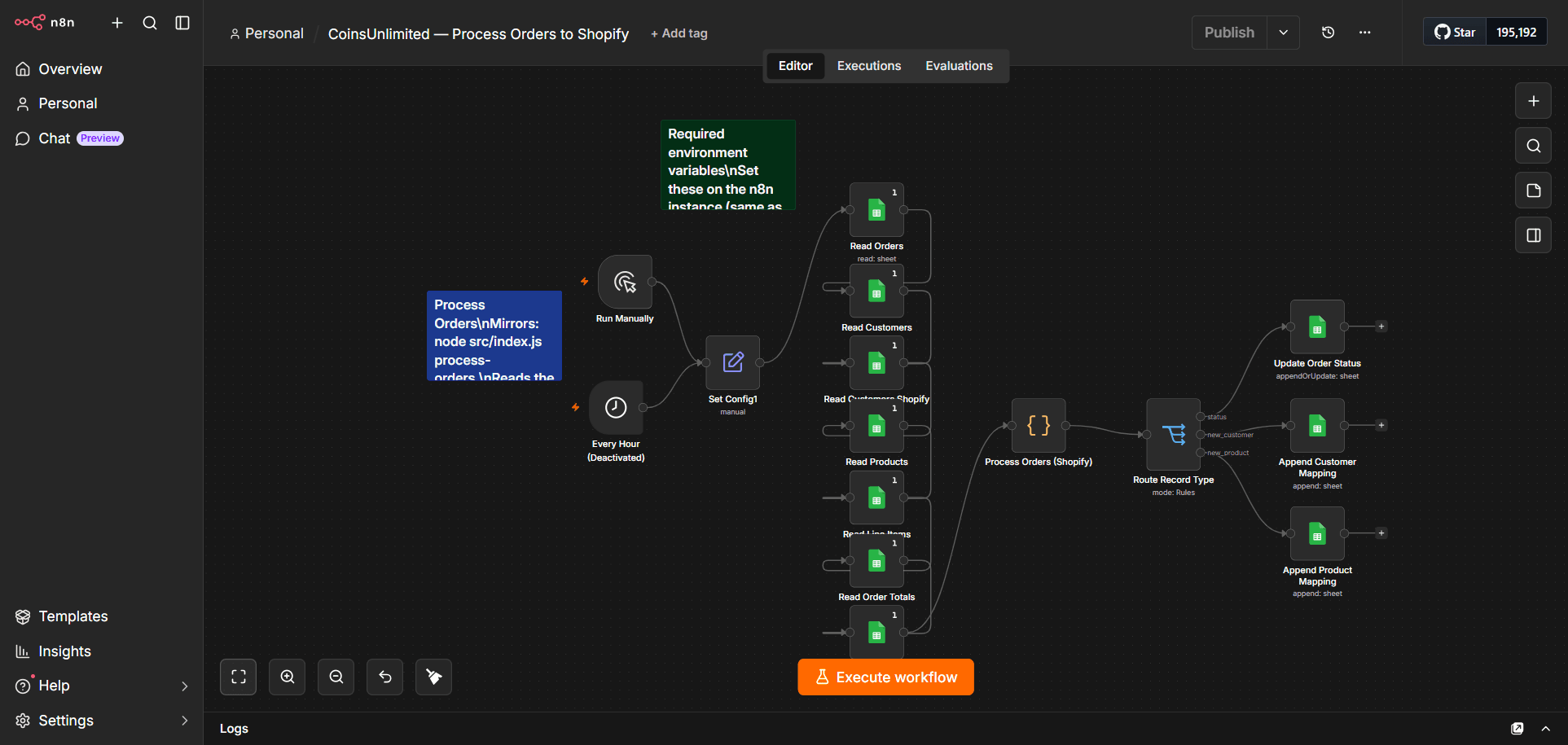
Each of the four active Node.js commands became its own n8n workflow — Process Orders to Shopify (hourly), Sync Customers from Shopify (daily), Sync Products from Shopify (daily), and Assign Emails to Shopify Customers (daily) — each carrying both a manual trigger for testing/on-demand runs and a schedule trigger for unattended operation. This gives the business direct visibility and control over when each step of the automation runs, directly in the n8n UI, without needing an externally configured OS-level scheduler pointed at a script.
Order Processing Ported as a Single Code Node
The Process Orders workflow is the most complex of the four, so rather than fragmenting its logic across many small native n8n nodes, the entire order-processing pipeline — Shopify authentication, customer and product resolution, currency conversion, shipping/tax total computation, order creation, and default-address restoration — was ported into one JavaScript Code node that mirrors the original, already-proven Node.js function. A downstream Switch node then routes the three distinct output types (order status, new customer, new product) to the correct Google Sheets destination, replicating in a visual graph what the original tool did as sequential function calls.
Same Data Contracts, Same Credentials
The workflows read and write the exact same Google Sheets spreadsheet, tab names, and Shopify store as the original Node.js tool, authenticating with the same Google service-account key and the same Shopify client-credentials grant. This means the two implementations can operate against the same live data without schema conflicts, and an operator who already understands the original tool's configuration immediately understands what to configure in n8n.
Upsert-Based Syncing for Safer Partial Failures
Where the original Node.js sync commands cleared and rewrote an entire sheet tab on every run, the n8n Sync Customers and Sync Products workflows instead upsert — matching existing rows by ID and updating them in place, inserting only previously-unseen records. This is a deliberate, documented improvement in failure behavior: an interrupted upsert leaves existing correct data untouched, whereas an interrupted clear-and-overwrite can leave a tab transiently empty or truncated.
Assigning Emails and Handling Shared Customer Notes
The Assign Emails workflow matches internal customer records to Shopify customers via a note field and writes the resulting email back onto the matched Shopify customer. When the underlying data model was extended to let a single Shopify customer map to multiple internal customer IDs (stored as a comma-separated list), both this workflow and Process Orders were updated in lockstep with the same change being made to the Node.js tool — keeping the two implementations behaviorally consistent as the business rules evolved, rather than letting them silently drift apart.
Safe-by-Default Deployment and Documented Trade-Offs
All four workflows were deployed inactive with placeholder credentials, requiring a deliberate one-time setup — configuring the Google service-account credential, host environment variables, and target sheet tabs — before an operator could activate them, so a newly built automation could never start writing to production data before someone verified its configuration. Every intentional behavioral simplification versus the original tool was written down rather than left implicit: a fixed conservative delay between Shopify API calls in place of the original's fully adaptive rate limiter, a simplified single-field retry on customer-creation errors, and product images being omitted from orders created through n8n (consistent with the original tool's own design, where images were always a non-fatal enhancement). Two destructive, store-wide maintenance commands were kept out of the automation entirely, so the highest-risk operations remain deliberate and human-triggered no matter how often the rest of the system runs.
Product Screenshots
A closer look at the platform in action.
Technology Stack
The tools and technologies powering this solution