
Hermes Agent — AI-Driven Server Management over Signal
Deployed Hermes Agent, an autonomous AI agent, on a self-hosted Contabo VPS and wired it up to Signal — turning routine server administration, deployments, and debugging into plain-language chat messages sent from a phone, with no SSH session required for day-to-day tasks.
27
Tools Available
Browser control, code execution, cron, Docker/nginx, GitHub, delegation, and more
77
Skills Installed
Covering DevOps, note-taking, research, social media, smart home, and software development
3,300+ messages
Sessions Logged
Across Signal, CLI, and curator sessions tracked in the dashboard's session history
Rare
SSH Required for Routine Tasks
Deployments, SSL setup, and log checks are now handled conversationally over Signal
The Challenge
Managing a self-hosted VPS day-to-day usually means being at a laptop with a terminal open — checking container status, provisioning SSL certificates for a new subdomain, debugging a broken deployment, or restarting a service. Most of these tasks are quick, but require pulling out a machine, opening an SSH session, and remembering the right commands. The goal was to remove that friction entirely: to be able to manage the server, kick off deployments, and debug issues from anywhere, using an app already open all day — a phone's messaging app — without giving up the ability to drop into a real shell when needed.
Our Solution
Hermes Agent, an open-source autonomous agent framework built on top of large language models with a large catalog of tools and skills, was deployed on a Contabo-hosted Ubuntu VPS and paired with a dedicated Signal account as its messaging front end. Once paired, the agent runs as a persistent gateway process on the server, able to receive natural-language instructions over Signal and act on them directly on the box — inspecting Docker containers, provisioning new sites behind the existing nginx-proxy/acme-companion/Let's Encrypt reverse-proxy setup, tailing logs, running scheduled jobs, and executing arbitrary shell/code actions through its tool layer. A web dashboard exposes the same agent for session history, connected-platform status, cron jobs, skills, and plugin management, so the Signal interface and a browser-based control panel both stay in sync with the same underlying agent state.
How We Built It
A detailed look at each layer of the automated pipeline architecture.
Signal as the Server's Front Door
A dedicated Signal account was paired with the agent running on the VPS, turning an ordinary chat thread into a live administration channel. Sending a plain-language request — deploy this container, check why a site is down, provision a new subdomain — gets picked up by the agent's Signal integration and executed on the server, with the result (including next steps and links) posted straight back into the chat. This removes the need to open a laptop or SSH client for the kind of small, frequent tasks that otherwise interrupt a workday.
A Real Shell Underneath the Chat Interface
Signal is one front end, not the only one — the same agent is equally reachable from its own CLI on the server itself, giving a fuller terminal-style view of available tools and skills when deeper, more deliberate work is needed. The CLI splash screen surfaces the agent's 27 tools (browser automation, code execution, cron jobs, GitHub auth, MCP, delegation to sub-tasks, and more) and 77 installed skills across categories like DevOps, note-taking, research, and software development, making it possible to drop from a quick Signal message into a full working session on the same underlying agent without losing context.
Provisioning and Deploying Behind an Existing Reverse Proxy
The VPS already ran a standard nginx-proxy + docker-gen + acme-companion setup for automatic reverse-proxying and Let's Encrypt certificate issuance for containerized sites. Hermes Agent was taught to work with this existing infrastructure rather than replace it: deploying a new container is enough to have it auto-detected via Docker environment labels, fronted with HTTPS, and issued a certificate — all confirmed back over Signal once the deployment and certificate provisioning complete, as shown by a real verification message summarizing container status and the resulting HTTP/HTTPS URLs.
A Dashboard for Everything the Agent Is Doing
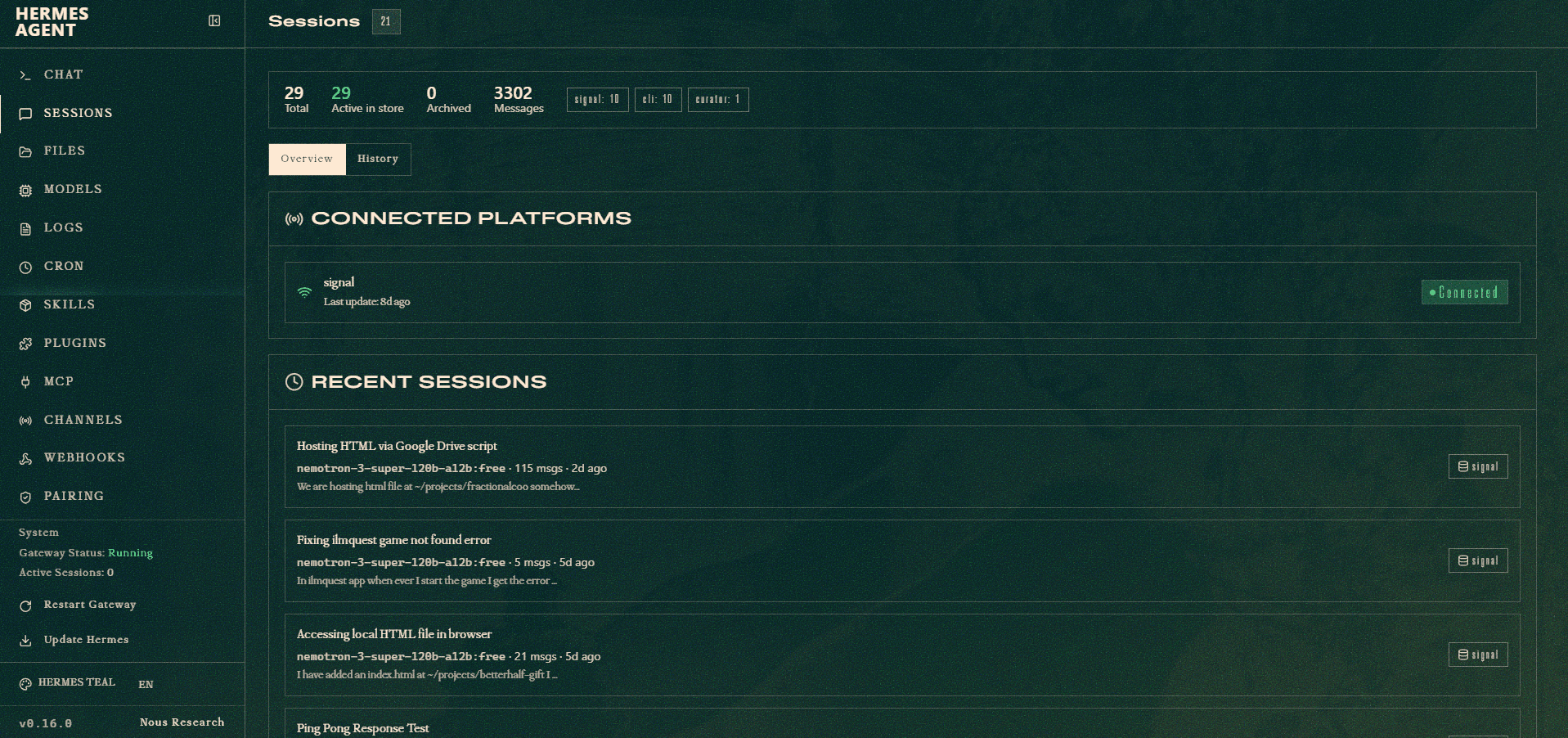
Alongside the chat interface, a web dashboard tracks the agent's operational state: total and active sessions, message counts broken down by originating platform (Signal, CLI, or an internal curator process), connected-platform health, and recent session summaries with titles auto-derived from their content. Dedicated sections manage cron jobs, installed skills, plugins, MCP connections, channels, webhooks, and device pairing — giving a single place to audit what the agent is configured to do and what it has recently done, independent of which front end (Signal or terminal) triggered a given action.
Why Signal, and Why This Matters as Internal Tooling
This was built purely for personal/internal use rather than for a client, as a way to explore how far an agentic AI framework could go in replacing routine SSH sessions for server upkeep. Signal was chosen as the messaging front end for its end-to-end encryption and because it's an app already checked constantly, rather than adding another dashboard or app to monitor. The result is a lower-friction habit loop: a server-management thought turns directly into a sent message, and the agent — backed by its full tool and skill set — handles the execution, reporting back with the outcome instead of requiring a context switch into a terminal.
Product Screenshots
A closer look at the platform in action.
Technology Stack
The tools and technologies powering this solution