Built by Steve Housaman, in collaboration with ITfiers

The operating system for modern builders

Run every job, team, and dollar from one construction platform.

ConstructionOS unifies scheduling, capacity planning, client CRM, weekly reporting, accounting, and an AI operations copilot — so residential and commercial builders stop juggling spreadsheets and start shipping projects on time.
18+Modules shown below
Residential + CommercialBuilt for both divisions
AI-nativeCopilot on every workflow
app.constructionos.com
ConstructionOS executive KPI dashboard

Live screenshot from ConstructionOS — financial figures blurred for confidentiality.
What it is

The command center your job sites have been missing

Construction runs on dozens of disconnected spreadsheets, email chains, and whiteboards. ConstructionOS pulls scheduling, resource planning, client communication, and financials into a single, real-time platform — purpose-built for the way builders actually work.

40+Integrated modules & trackers
12+Point tools replaced
2Divisions, one platform
24/7AI copilot & alerts
The problem

Growth shouldn't mean chaos

The tools most builders rely on break down exactly when the business scales. Here's what that costs you.

Schedules that lie

A slipped inspection cascades through a dozen dependent tasks — but the spreadsheet never updates. Crews show up to jobs that aren't ready, and nobody sees it coming until it's too late.

Blind capacity planning

You can't see, at a glance, which crews and PMs are overloaded next month. Overbooking leads to burnout and blown deadlines; underbooking leaves margin on the table.

Clients kept in the dark

Weekly updates get written from memory, formatted by hand, and emailed late. Owners feel out of the loop, trust erodes, and change-order disputes multiply.

Financials a month behind

Cash flow, AR aging, and revenue forecasts live in the accountant's laptop. By the time leadership sees the numbers, the decisions they'd inform are already made.

Knowledge that walks out the door

Process docs, punchlists, and warranty history are scattered across drives and inboxes. New hires ramp slowly and mistakes repeat across jobs.

Leadership flying blind

No single dashboard answers "are we on track?" Executives stitch the story together in meetings instead of steering from live data.

The platform

Every workflow your builder needs, connected

Not another point tool. A complete operating system where scheduling, capacity, clients, documents, and cash all speak the same language. Every screen below is a real screenshot from the live platform — sensitive names, addresses, and dollar figures are blurred for confidentiality.

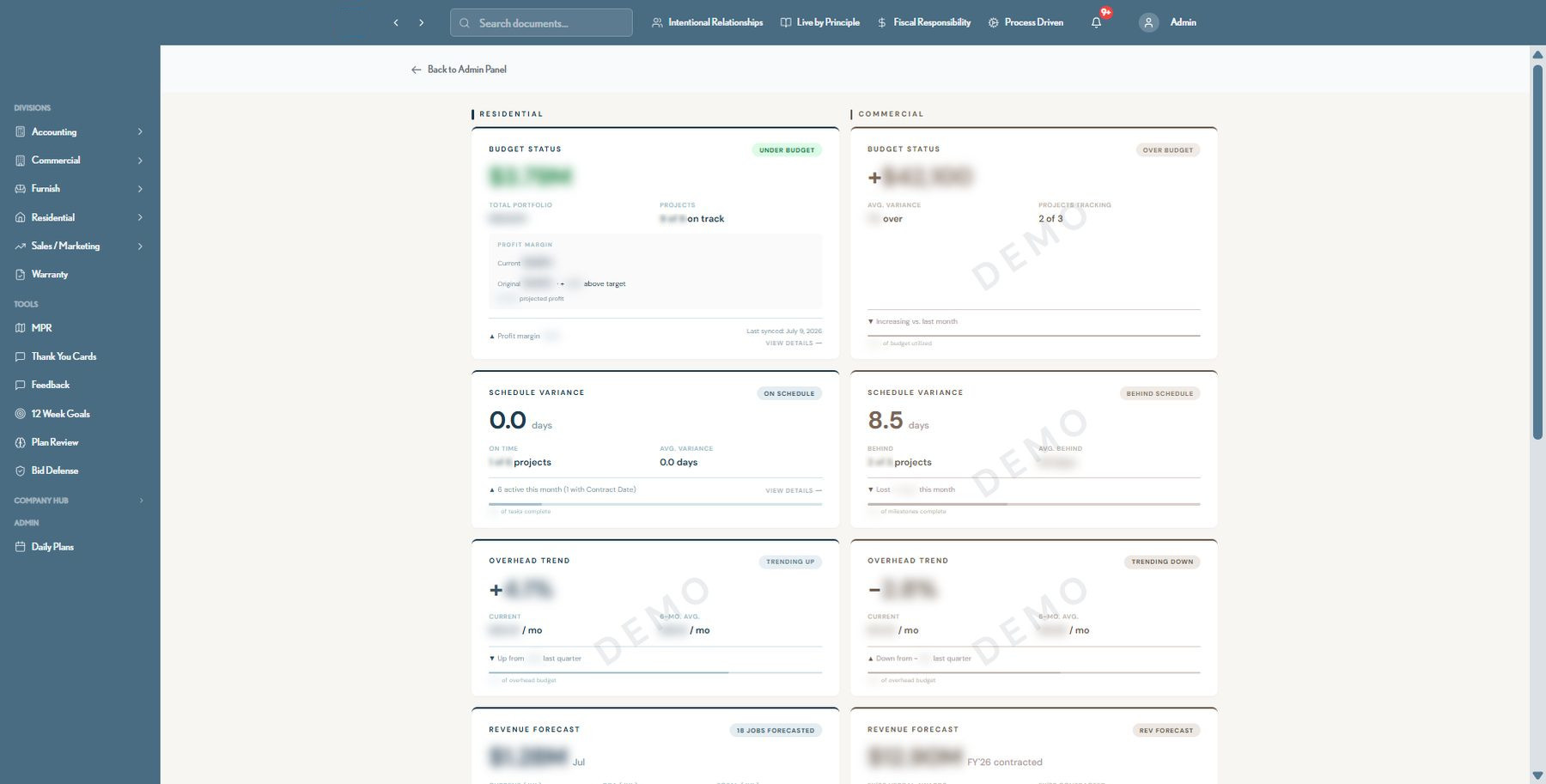
Executive KPI Dashboard

Every division's health, on one screen

Budget status, schedule variance, overhead trend, revenue forecast, AR aging, and warranty fund — for both Residential and Commercial — roll up into a single executive view so leadership never has to ask "are we on track?"

  • Real-time budget status vs. target, by division
  • Schedule variance across every active project
  • Revenue forecast: contracted + verbal awards, by fiscal year
  • Accounts receivable aging and warranty fund runway
Executive KPI Dashboard
ConstructionOS executive KPI dashboard with budget, schedule and revenue cards
Intelligent Job Scheduling

Schedules that fix themselves when reality shifts

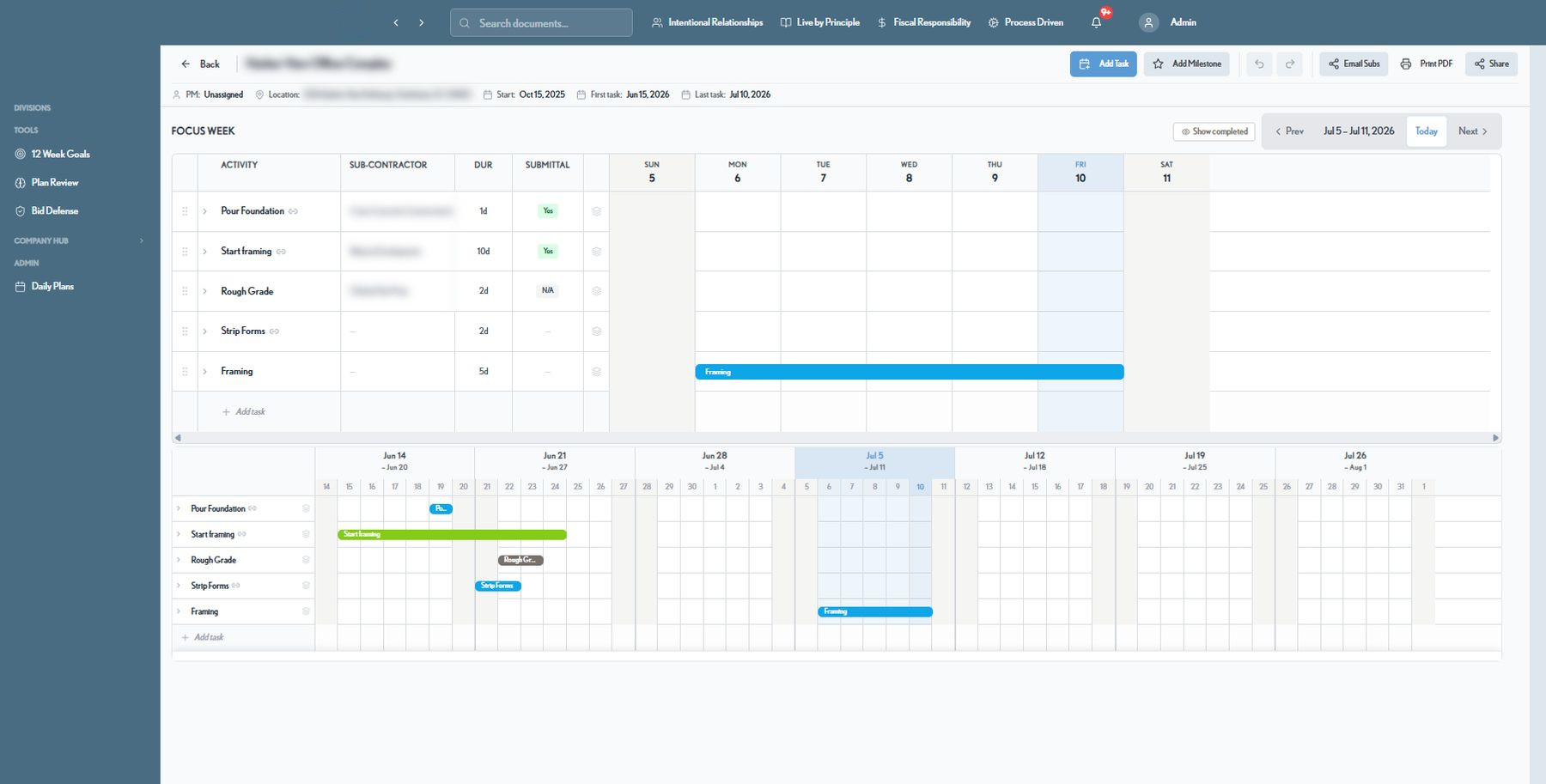
Build phase-based Gantt schedules with true predecessor logic. When a date moves, the entire dependent chain shifts automatically — with lag, duration, and calendar dates staying perfectly in sync. No more silent breakage.

  • Predecessor chains with automatic cascade & chain-shift
  • Focus Week view plus a full multi-month calendar timeline
  • Sub-contractor assignments, durations, and submittal tracking per task
  • Delay tracking and full, undoable schedule history
Schedule · Focus Week
ConstructionOS Gantt job schedule with predecessor chains and focus week view
Capacity & Loading Chart

See exactly who's overloaded — before you commit

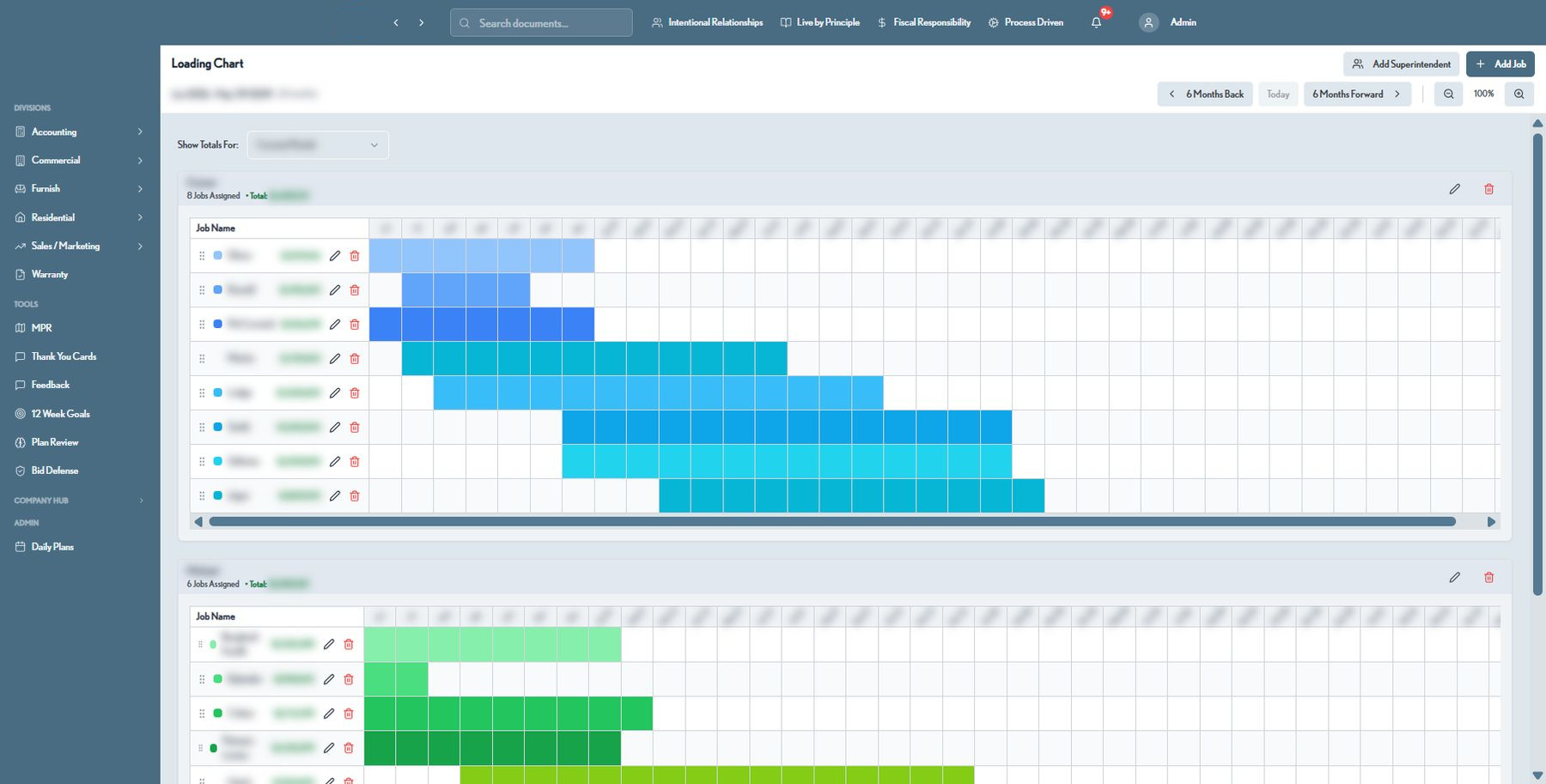
A living resource grid shows every superintendent's job load across a 36-month horizon. Spot the red zones early, rebalance the pipeline, and win more work without breaking your teams.

  • Multi-year, month-by-month engagement view per superintendent
  • Color-coded job bars sized to real contract duration
  • Per-job contract totals rolled up per superintendent
  • Separate residential, commercial, and furnish pipelines
Loading Chart · Capacity Planning
ConstructionOS loading chart capacity planning view with colored job bars
Client Weekly Reports

Professional client updates, generated in minutes

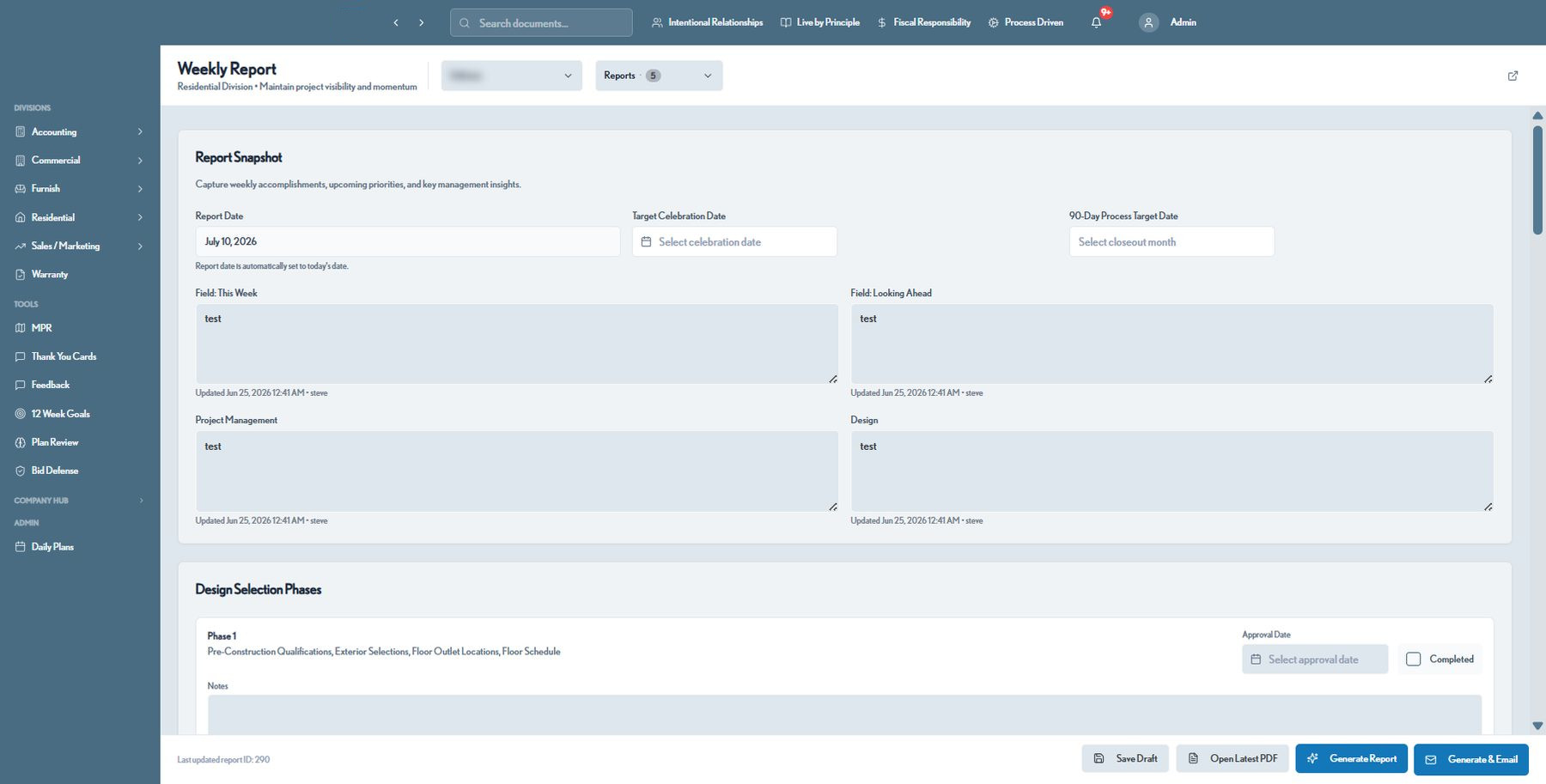
Turn job progress into branded, PDF-quality weekly reports your clients actually look forward to. Track design selection phases and approvals, then share a live link or export to PDF — every owner stays informed.

  • Structured snapshot: this week, looking ahead, PM & design notes
  • Design selection phase tracker with approval dates
  • Secure, tokenized share links — no login required for clients
  • One-click PDF export and email delivery
Weekly Report Builder
ConstructionOS weekly client report builder with design selection phases
Job Directory

Every active job, searchable in one place

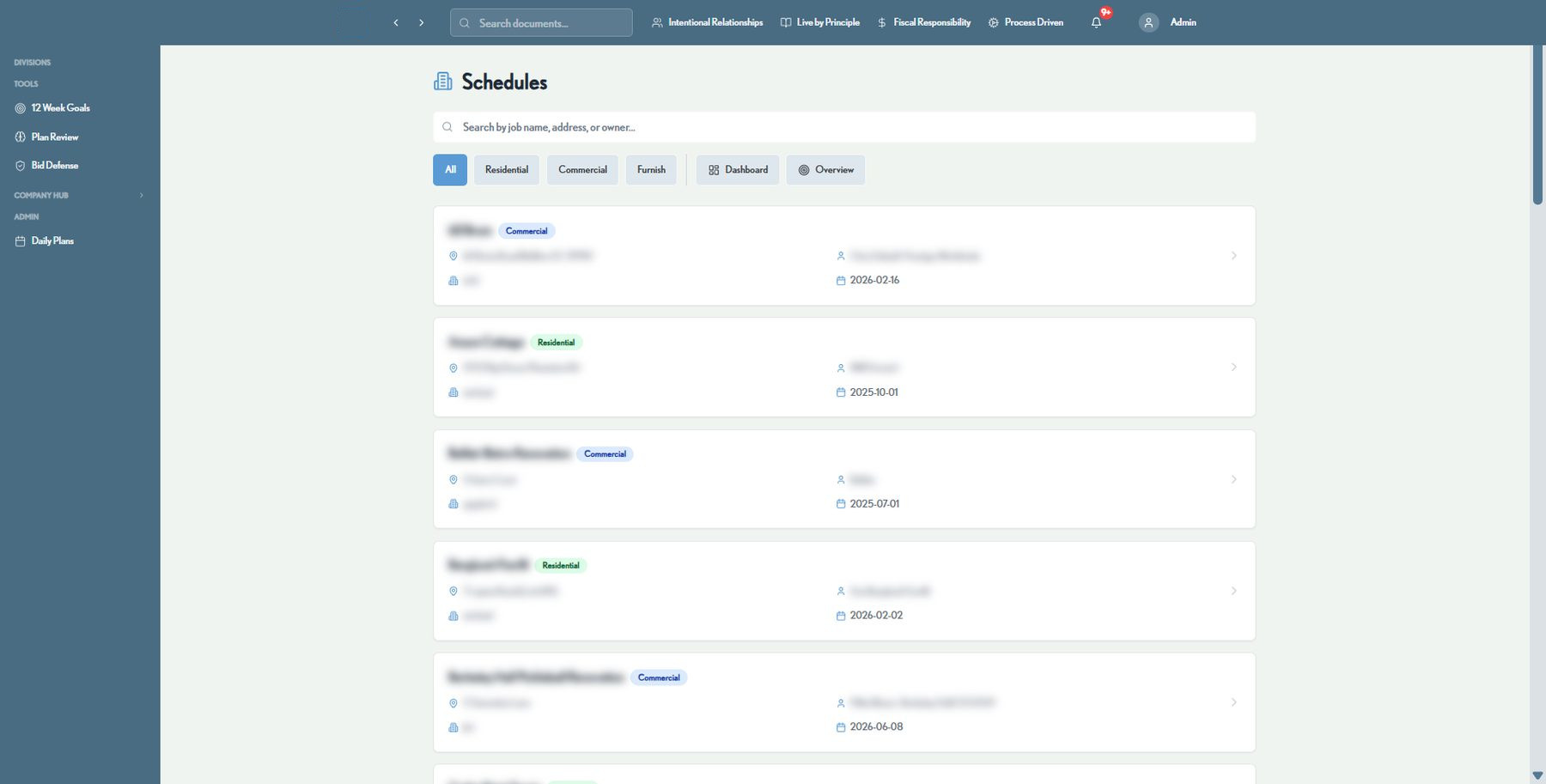
Browse every residential, commercial, and furnish job with its address, owner, and assigned project manager. Filter by division or jump straight into a job's live schedule.

  • Instant search by job name, address, or owner
  • Filter by Residential, Commercial, or Furnish
  • One click into a job's full schedule and history
  • Portfolio-wide dashboard and overview rollups
Schedules · Job Directory
ConstructionOS job directory with search and division filters
Sales CRM

Never let a lead or relationship slip through the cracks

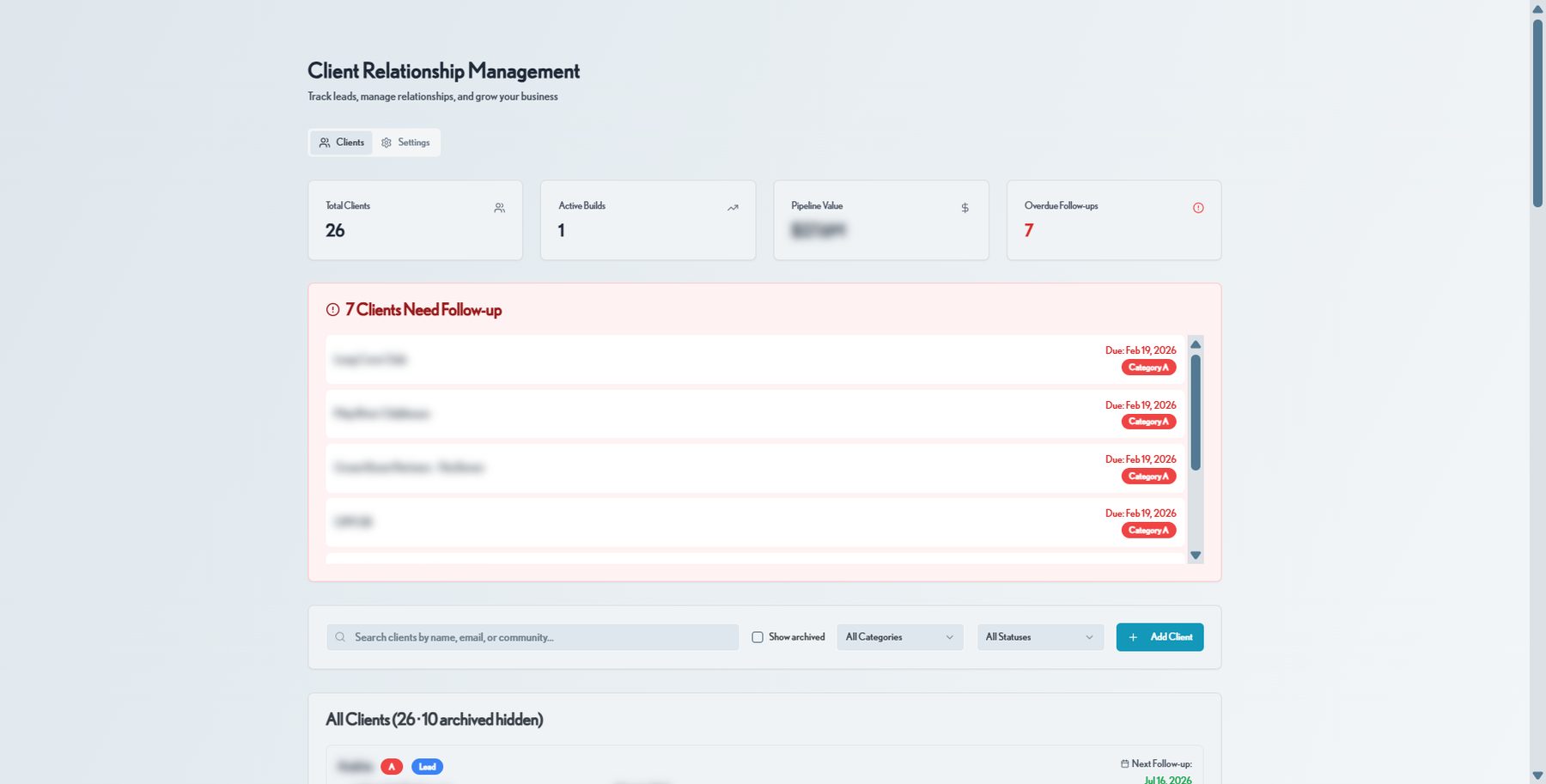
Track leads, active builds, and pipeline value in one relationship hub. Automatic follow-up reminders and category scoring (A–D) keep your sales and client-experience teams focused on what matters most this week.

  • Pipeline value and overdue follow-up alerts at a glance
  • A–D category scoring with Lead / DBA / Under Contract status
  • Search by name, email, or community
  • Full client history: budget, contact info, and next steps
Client Relationship Management
ConstructionOS CRM client relationship management dashboard
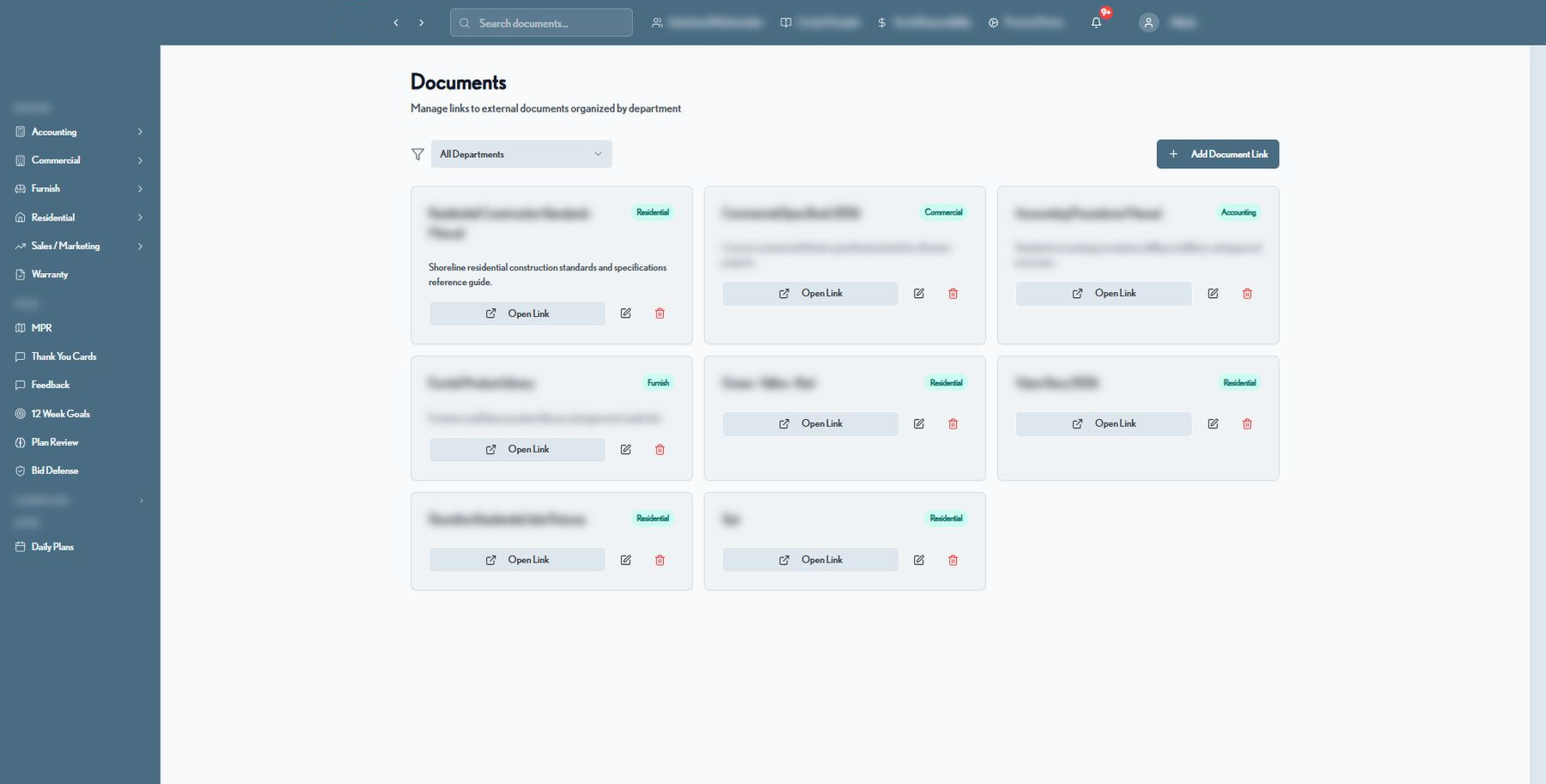
Centralized Document Library

Every process doc, spec book, and reference — one click away

Standards manuals, spec books, product libraries, and vision documents live in a searchable, department-organized library, so institutional knowledge stays put even as your team grows.

  • Organized by department: Residential, Commercial, Accounting, Furnish
  • Filter and search across the entire library
  • One-click links out to the source document
  • Simple add/edit workflow for admins
Documents · Library
ConstructionOS centralized document library organized by department
AI Operations Copilot

An executive assistant that reads your whole business

The built-in AI copilot and executive agent surface risks, draft communications, generate daily briefs, and answer questions across your jobs, schedules, and financials — so leaders spend time deciding, not digging.

  • Natural-language questions across every module
  • Daily briefs, alerts, and proactive suggestions
  • Drafts client emails, agendas, and summaries instantly
  • Flags at-risk tasks before they become problems
ConstructionOS Copilot
Your operations assistant
Which residential jobs are at risk of slipping this month?
3 jobs need attention. Lakeside Residence has a framing inspection blocking 4 downstream tasks. Harbor Point is 2 days behind on MEP. Birchwood's cabinetry delivery moved to Sep 3 — I've flagged the schedule impact. Want me to draft owner updates for all three?
Yes, and add them to Thursday's PM agenda.
Done. Drafts are ready in Weekly Reports, and I've added all three to the Residential PM agenda for Thursday. ✅

Illustrative interface — representative of the AI Copilot workflow.

And much more

A module for every part of the build

Beyond the core, ConstructionOS covers the operational details that keep jobs moving and clients happy. More real screenshots below — figures and names blurred for confidentiality.
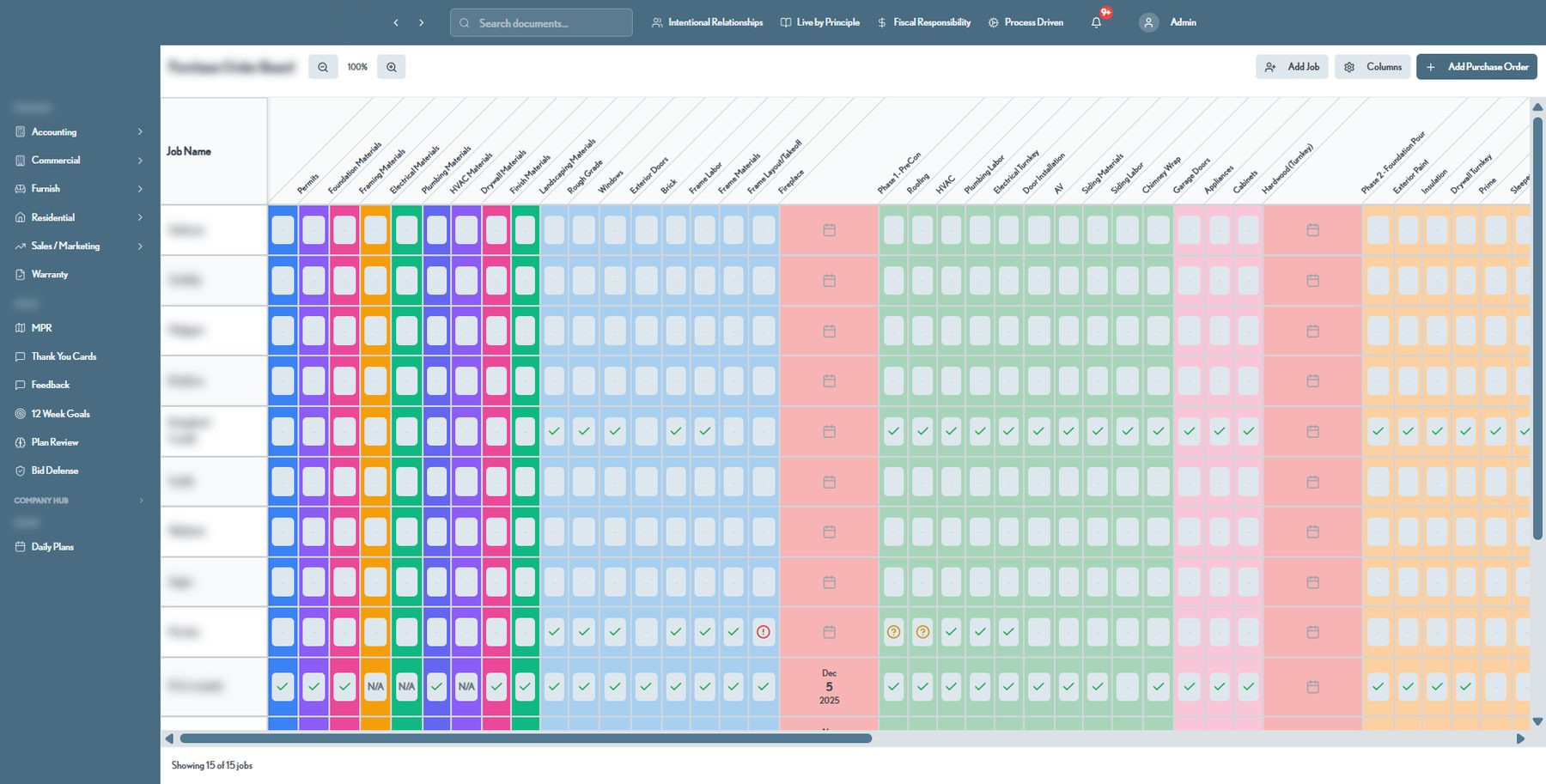
Purchase Order Board

Procurement tracked across every category, every job

A color-coded matrix tracks permits, materials, and labor purchase orders phase by phase for every active job — so nothing gets ordered late and nothing falls through the cracks.

  • One row per job, one column per PO category
  • Visual status: pending, confirmed, flagged, or N/A
  • Covers Pre-Con through framing, MEP, and finish categories
  • Add jobs, columns, and purchase orders inline
Purchase Order Board
ConstructionOS purchase order board tracking materials and labor by job
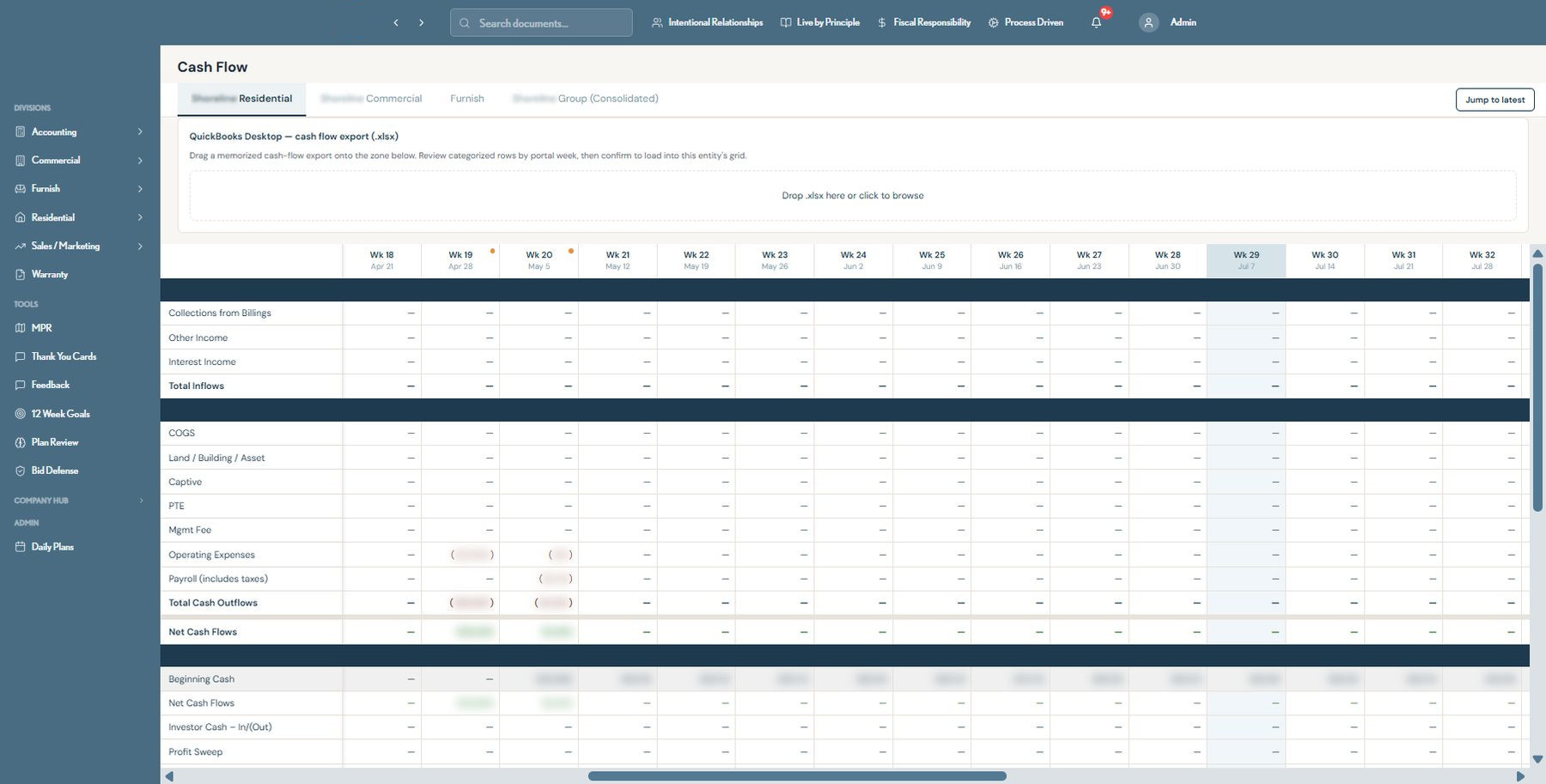
Accounting & Cash Flow

Weekly cash flow, imported straight from QuickBooks

Drop in a QuickBooks cash-flow export and ConstructionOS organizes it into a categorized, week-by-week grid per entity — Residential, Commercial, Furnish, or the consolidated group — so leadership always knows the real cash position.

  • Inflows, outflows, and net cash by week, by entity
  • Beginning cash, investor activity, and profit sweep tracked
  • One-click .xlsx import from QuickBooks Desktop
  • Jump straight to the latest week
Cash Flow · Residential Division
ConstructionOS weekly cash flow grid imported from QuickBooks
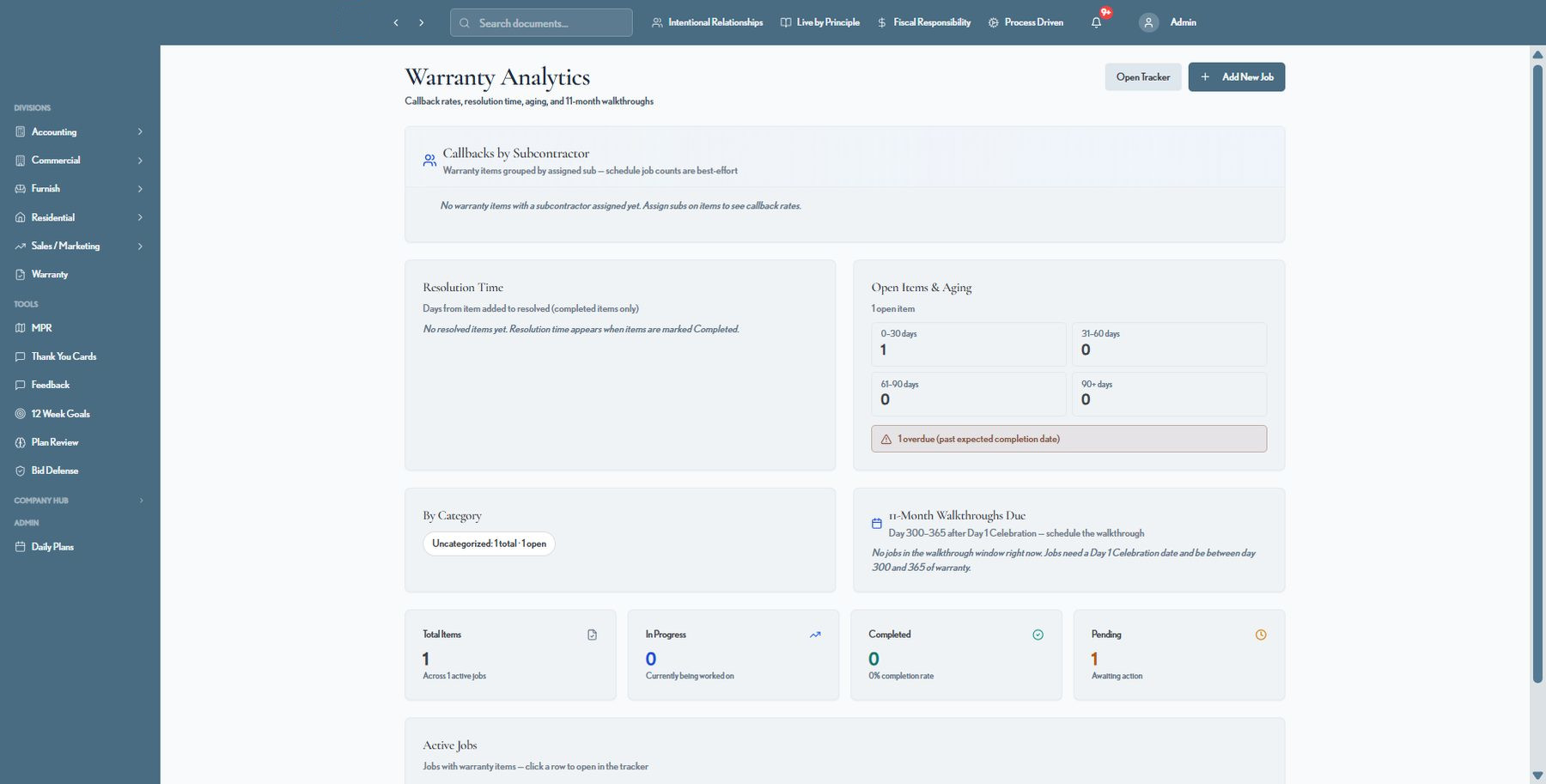
Warranty Analytics

Warranty performance, measured automatically

Callback rates by subcontractor, resolution time, aging buckets, and 11-month walkthrough scheduling all roll up automatically from the punchlist and warranty trackers — no manual reporting required.

  • Open items aged in 0–30 / 31–60 / 61–90 / 90+ day buckets
  • Resolution time tracked from item added to completed
  • Automatic 11-month walkthrough scheduling window
  • Category breakdown and callback rates by subcontractor
Warranty Analytics
ConstructionOS warranty analytics dashboard with aging and resolution time
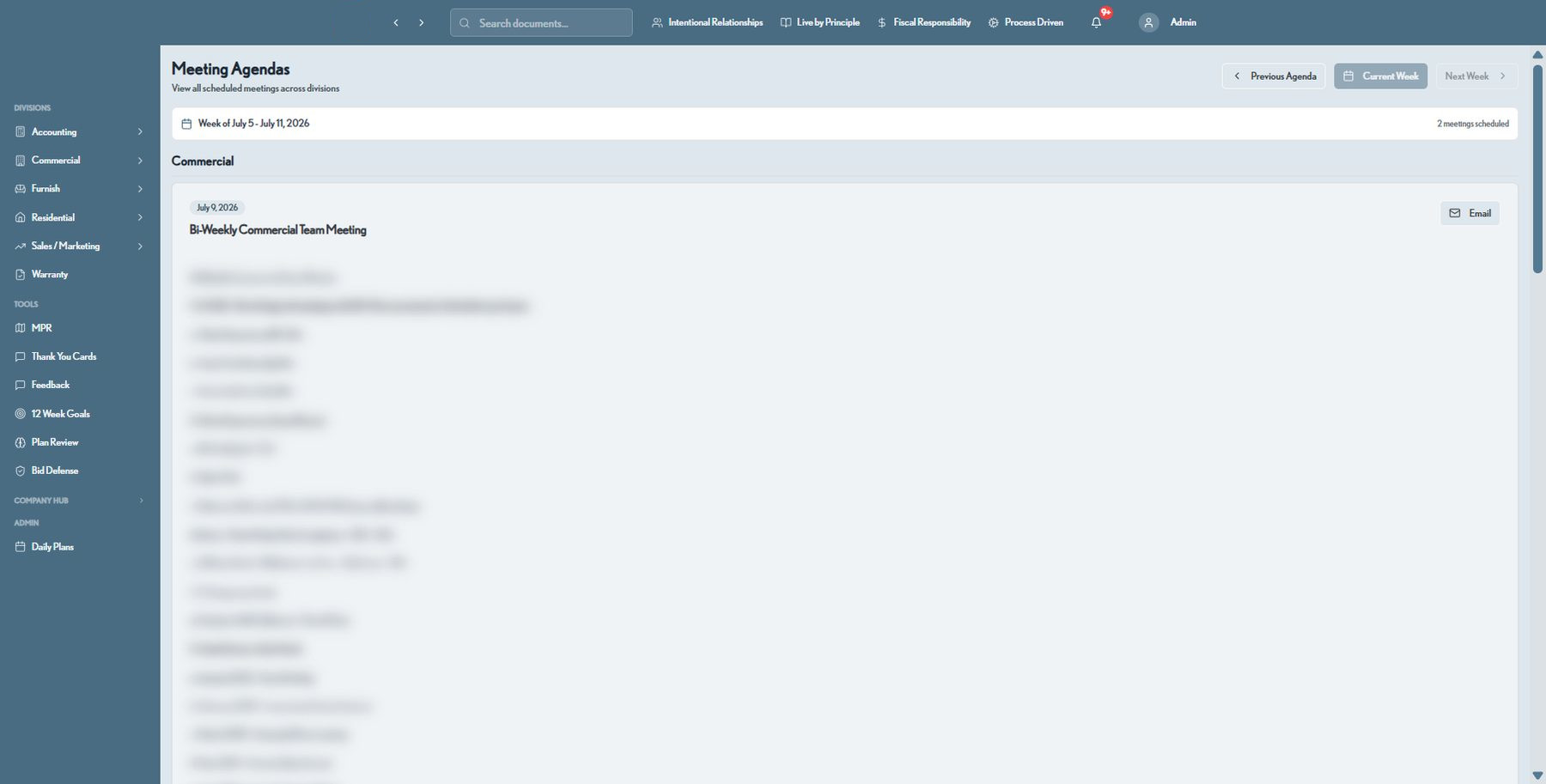
Meeting Agendas

Every department's meetings, structured and searchable

Bi-weekly and weekly team meetings across Commercial, Residential, Sales, and Leadership follow a consistent agenda format — Big Wins, client experience updates, trade partner recognition — browsable by week.

  • One shared calendar of meetings across every division
  • Structured, repeatable agenda template per meeting type
  • Browse previous and upcoming weeks instantly
  • One-click email of the agenda to attendees
Meeting Agendas · Commercial
ConstructionOS meeting agendas for the commercial division
Daily Plans

Every superintendent's day, rolled up for leadership

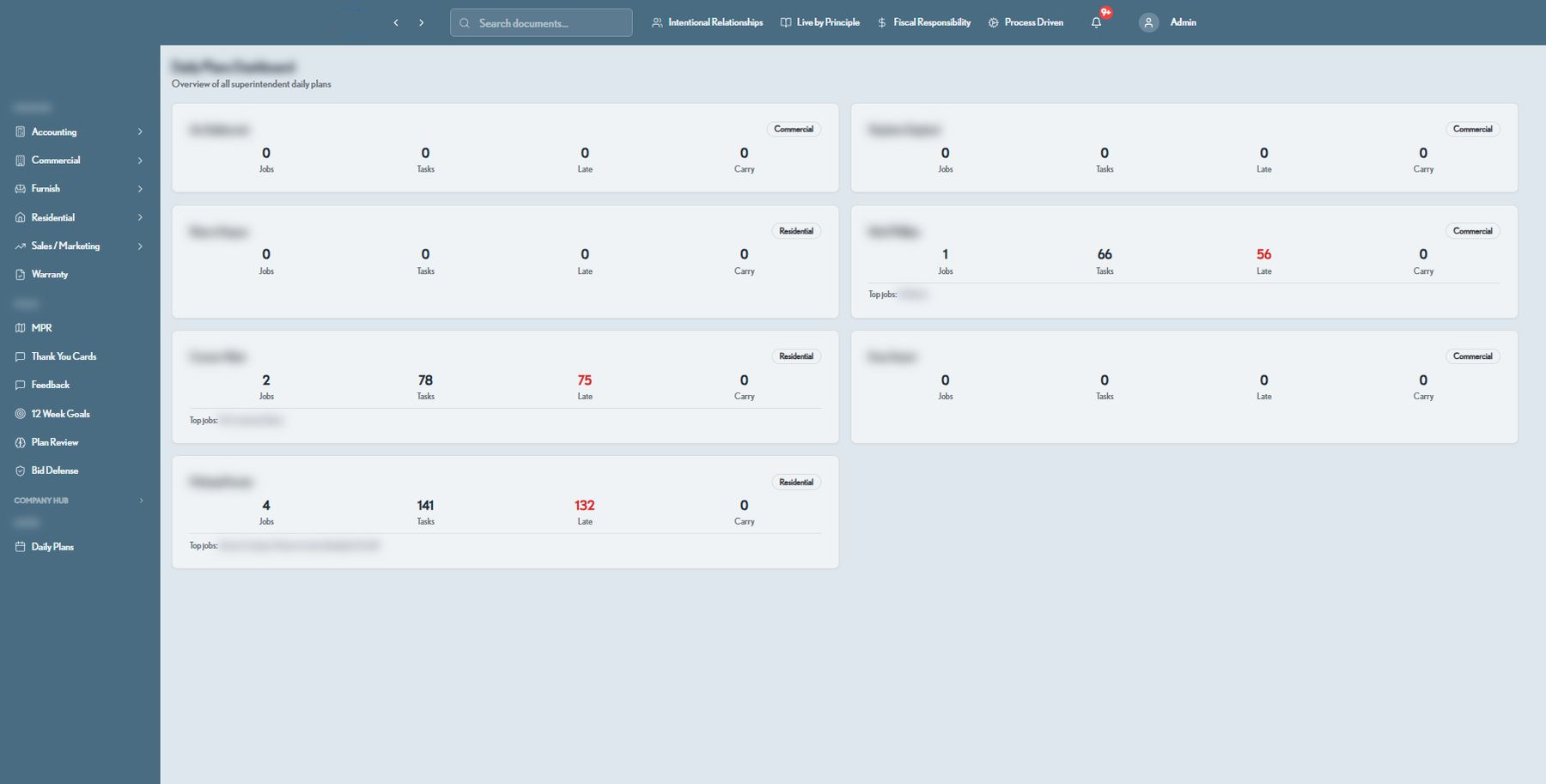
A live dashboard shows job counts, task counts, and late-task alerts for every superintendent across Residential and Commercial — so operations leadership can spot who needs support before the day gets away from them.

  • Per-superintendent job, task, late, and carry-over counts
  • Division tagging across Residential and Commercial
  • Top jobs surfaced per superintendent
  • Individual Focus and AI Assistant views for each plan
Daily Plan Dashboard
ConstructionOS daily plan dashboard across all superintendents
12-Week Goals

Company goals, broken into trackable tactics

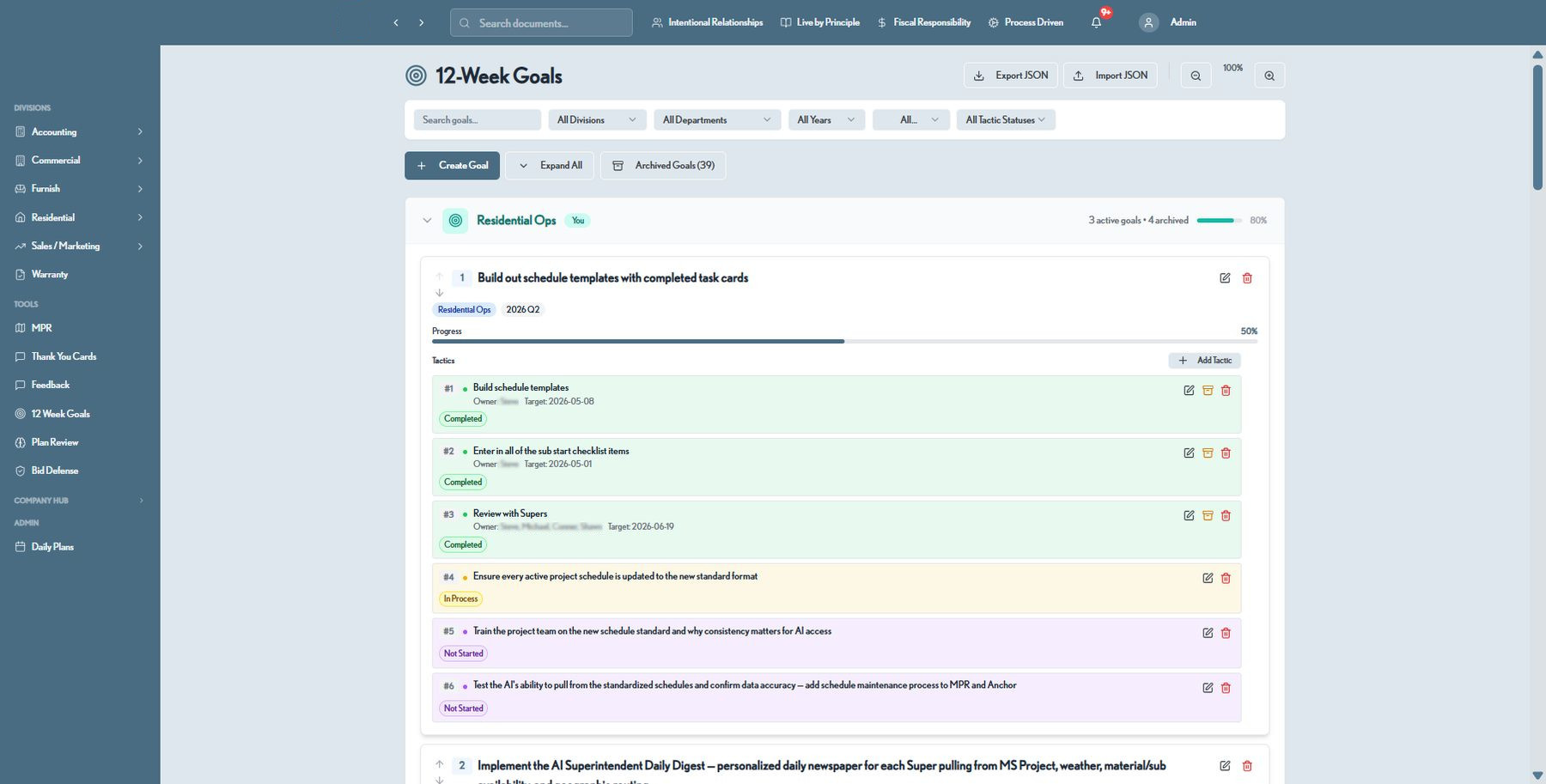
Every division sets 12-week goals with concrete tactics, owners, target dates, and status — so quarterly priorities turn into weekly execution instead of getting lost after the planning meeting.

  • Goals organized by division and quarter
  • Tactic-level owners, target dates, and status tracking
  • Progress bars roll up from tactic completion
  • Export/import and full archive history
12-Week Goals · Residential Ops
ConstructionOS 12-week goals tracker with tactics and progress
Training & Certifications

Structured learning paths for every role

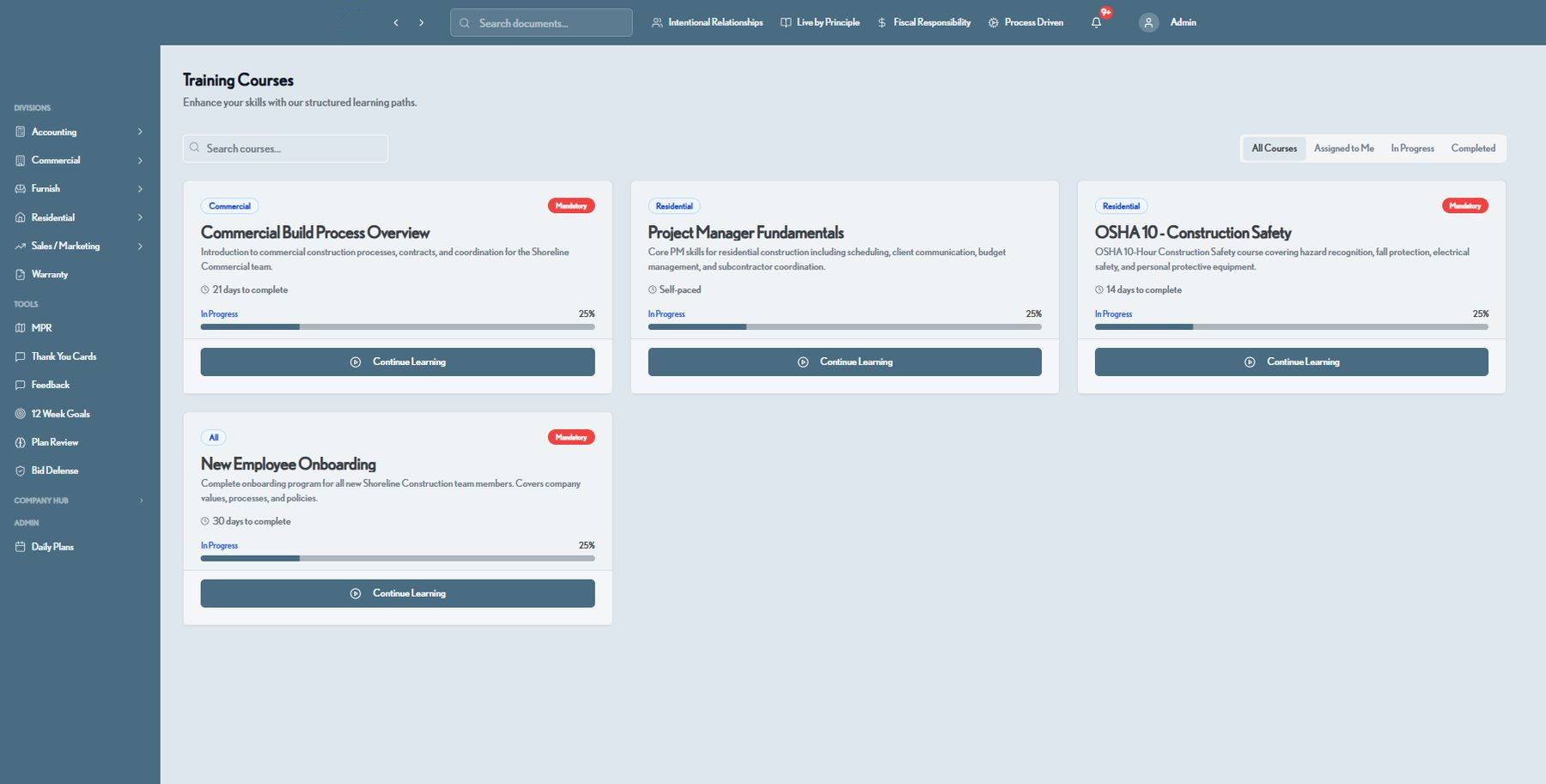
A built-in LMS delivers role-specific courses — from OSHA safety to project management fundamentals — with progress tracking and mandatory-course flags, so every new hire ramps on the same standard.

  • Courses tagged by division: Commercial, Residential, All
  • Mandatory-course flags and estimated completion time
  • Progress tracking per learner, per course
  • Filter by assigned, in progress, or completed
Training Courses
ConstructionOS training courses library with progress tracking
Bid Defense

Defend every bid with a full paper trail

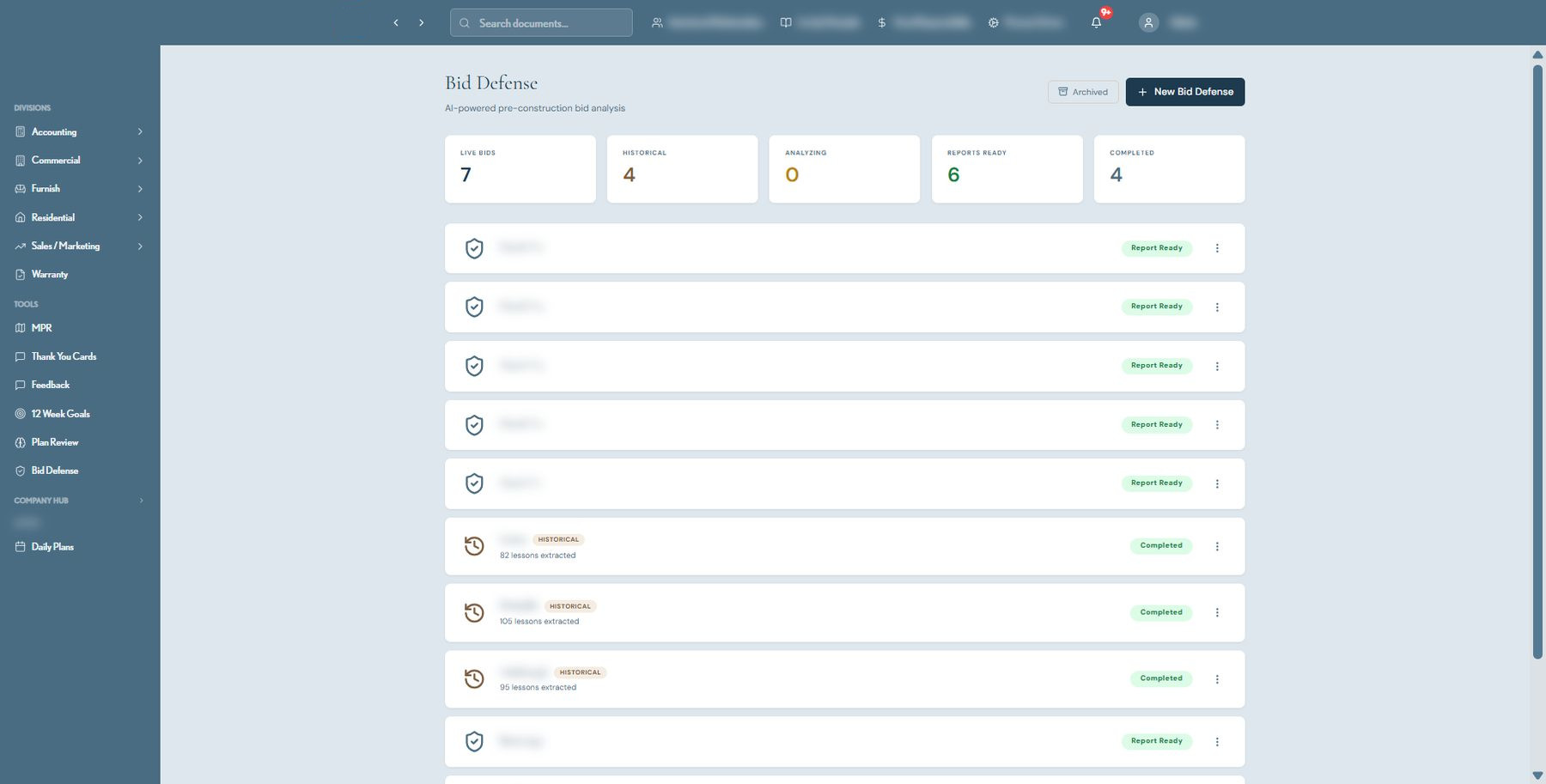
Live and historical bids are tracked from first analysis through final report, with lessons extracted from every closed pursuit — so estimating gets sharper and every number in a proposal can be defended.

  • Live bid counters: analyzing, report-ready, completed
  • Historical archive with lessons extracted per project
  • AI-powered pre-construction bid analysis
  • One-click archive and new-bid creation
Bid Defense
ConstructionOS Bid Defense tracker with live and historical bids
Plan Review

Let AI read the plans before your team does

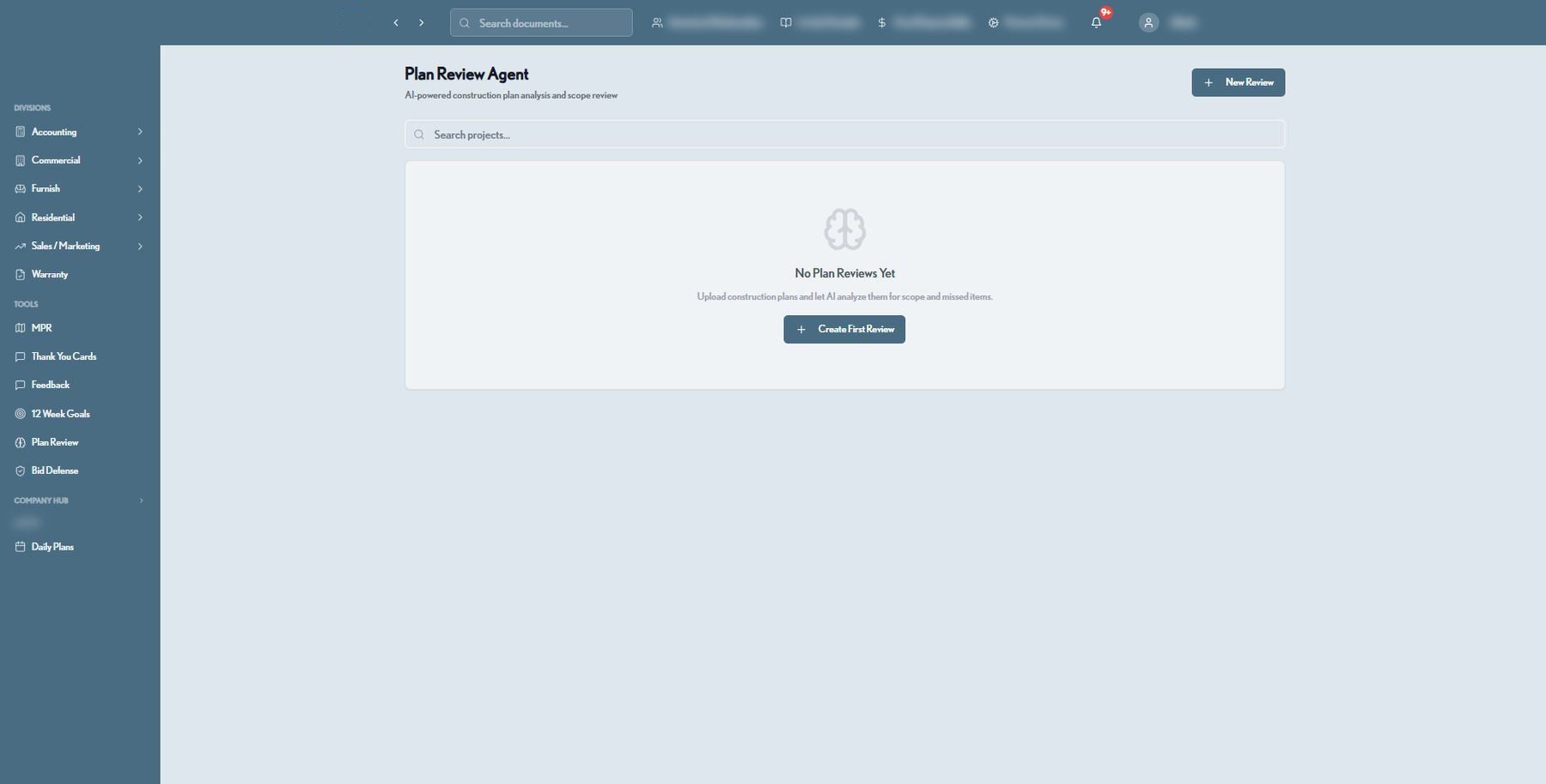
Upload construction plans and the AI Plan Review Agent scans for scope gaps and missed items before a job breaks ground — catching costly omissions while they're still cheap to fix.

  • AI-powered construction plan analysis
  • Scope and missed-item detection
  • Per-project review history and search
  • Works alongside Bid Defense for pre-construction review
Plan Review Agent
ConstructionOS AI Plan Review Agent
Commercial CRM

A live pipeline view built for commercial pursuit

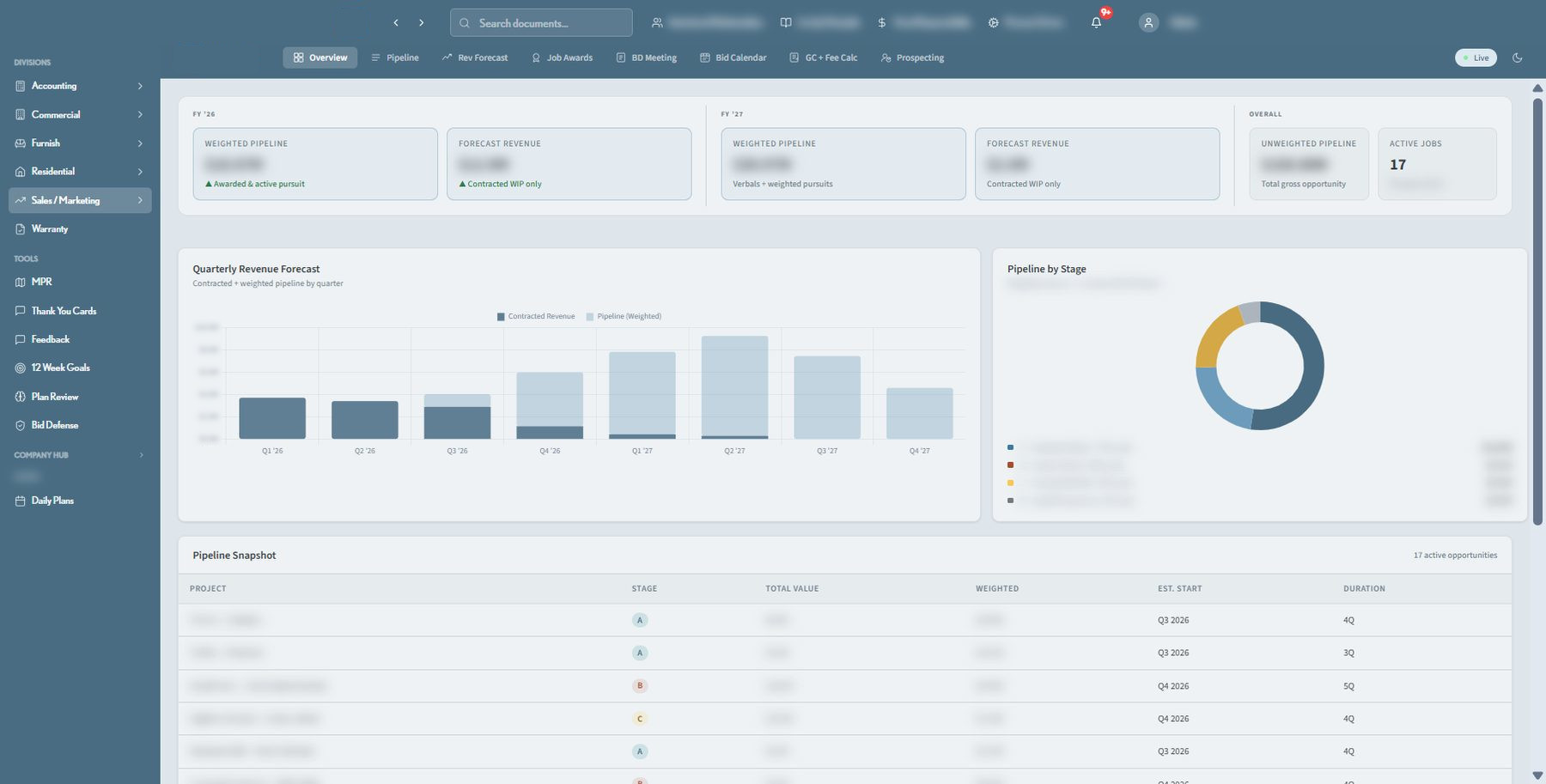
Weighted pipeline, forecast revenue, and win probability roll up by fiscal year and stage, with every active opportunity tracked from lead through award — giving leadership a real-time read on the commercial book of business.

  • Weighted pipeline and forecast revenue by fiscal year
  • Quarterly revenue forecast and pipeline-by-stage charts
  • Full opportunity snapshot: stage, value, est. start, duration
  • Dedicated tools for Pipeline, Rev Forecast, Job Awards, and Bid Calendar
Commercial CRM · Overview
ConstructionOS Commercial CRM pipeline dashboard, financial figures blurred

And still more under the hood

A few more modules that round out the platform.

Master Punchlist & Closeout

Master punchlist, ARB inspection, and 90-day closeout trackers keep every job accountable through final handoff — with live counts for total, in-progress, completed, and pending items across all active jobs.

Realtor & Commercial CRM

Dedicated pipelines for realtor referrals alongside the core residential and commercial CRMs.

The payoff

What builders gain with ConstructionOS

Real operational leverage — the kind that shows up in your margins and your reputation.

Deliver on time, more often

Self-correcting schedules and early risk alerts mean fewer surprises, tighter timelines, and jobs that finish when you promised.

📈

Protect your margins

Right-size crews with live loading data and catch cost drift before it eats your profit. Take on more work without over-hiring.

🤝

Win client trust

Polished, consistent weekly reporting keeps owners confident and referrals flowing — turning clients into your best salespeople.

🧭

Lead from live data

Executives get one real-time source of truth across divisions, so decisions are made on facts — not the last meeting's recollection.

Move faster with AI

The copilot handles the busywork — briefs, drafts, summaries, risk-spotting — freeing your best people for higher-value work.

🗂

Retain institutional knowledge

Processes, punchlists, and training live in one place, so your standards survive turnover and scale with the company.

How it works

From kickoff to closeout, in one flow

ConstructionOS mirrors the real lifecycle of a job — every stage feeds the next, automatically.

1

Plan & schedule

Build phase-based schedules from templates. Predecessor logic keeps every dependency honest from day one.

2

Load & balance

The loading chart shows crew and PM capacity across the pipeline so you commit only to what you can deliver.

3

Execute & report

Track progress, punchlists, and POs in the field. Generate branded client reports in minutes, not hours.

4

Close & learn

90-day closeout, warranty, and analytics capture the lessons — while the AI copilot flags what to improve next.

Built for your team

One platform, tailored to every role

From the field to the boardroom, everyone works from the same real-time picture.

Project Managers

Own the schedule without the spreadsheet gymnastics.

  • Self-updating Gantt schedules with cascade logic
  • Focus Week and multi-month calendar views for crews and subs
  • Punchlist, warranty, and closeout tracking in one place

Sales & Client Experience

Keep clients delighted and pipelines full.

  • Residential, commercial & realtor CRM pipelines
  • Branded weekly reports clients love to receive
  • Client experience trackers across the journey
$

Finance & Accounting

Real-time financial truth, not month-end surprises.

  • Cash flow, AR aging & revenue forecasting
  • Controller billing and job-level revenue views
  • KPI dashboards leadership can trust

Owners & Executives

Steer the whole company from live data.

  • Cross-division executive KPI dashboard
  • AI executive agent with daily briefs & alerts
  • Meeting agendas, goals & company-wide visibility
Why ConstructionOS

Point tools solve one problem. ConstructionOS runs the whole company.

Generic construction software is bolted together from modules that never quite fit how you work. ConstructionOS was built from the ground up for multi-division builders — so it fits like it was made for you, because it was.

Purpose-built, not generic

Designed around real residential and commercial construction workflows — phases, loading, closeout — not a one-size-fits-all template.

🔗

Truly unified data

Schedules, CRM, reports, and financials share one source of truth. Change something once and it's right everywhere.

AI woven throughout

Not a chatbot bolted on the side — an operations copilot with context across your entire business.

📱

Works everywhere

Responsive and installable as an app, so the field and the office see the same live picture on any device.

🔒

Enterprise-grade security

Role-based access, granular permissions, and secure session auth keep sensitive job and financial data protected.

🧩

Scales with your divisions

Residential, commercial, furnish, accounting, and more — add teams and workflows without adding tools.

Thanks! This is a demo landing page — connect your form handler to go live.